
Subaru Crosstrek Owners Manual: Talking on the phone
The call screen opens when you perform the following operations.
- When you accept a call on the incoming
call screen (by selecting the
 key),
the call screen opens.
key),
the call screen opens. - When you are on the outgoing call screen, the screen changes to the call screen when the other party answers the call.
While talking on the phone, this screen is displayed. The operations outlined below can be performed on this screen.
- When the incoming call screen is displayed and you accept the call, the screen changes to the call screen. The screen stays on the incoming call screen if you reject the call.
- The
 and
and
 keys are disabled on
the incoming call screen.
keys are disabled on
the incoming call screen.
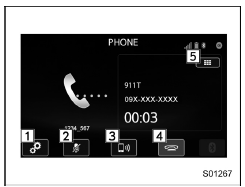
Call screen
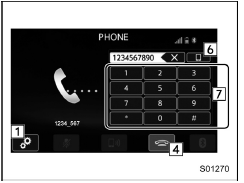
Call (Dialpad) screen (DTMF)
- Open the "Options" screen. Refer to "Phone volume settings"
- Mute your voice to the other party.
Touch this key again to deactivate the Mute mode. This key is disabled in the private mode.
- Change the mode to private mode.
The other party's voice emits from the cell phone. Touch this key again to deactivate the private mode.
- End the call. This will return you to the
phone (menu) screen when ending
outgoing calls and the previous
screen when ending incoming calls.
This function is the same as pressing the on hook switch on the steering wheel.
- Open the call (dialpad) screen. For details about how to use the function, refer to "By Dialpad"
- Switch the screen to the phone (menu) screen.
- Allow you to make DTMF (Dual Tone Multi Frequency) calls. The numbers you enter are sent as tone signals.
NOTE
- When cell phone call is changed to hands-free call, the hands-free screen is displayed and its functions can be operated on the screen.
- Changing between cell phone call and hands-free call can be performed by operating the cell phone directly.
- Transferring methods and operations will be different depending on the type of cell phone you have.
- For the operation of the cell phone, see the manual that comes with it.
- The sound quality of the voice heard from the other party's speaker may be negatively impacted.
 Receiving a call
Incoming calls
When a call is received, the incoming call
screen is displayed with a sound.
When you receive a phone call while the
cell phone is connected, the screen
changes to the incoming c ...
 Phone settings
You can transfer the phonebook information
and adjust the volume of your phone
using the Bluetooth phone system.
NOTE
The ringer volume for outgoing and
incoming calls, as well as the volume
...
Other materials:
Inspection
SECURITY AND LOCKS > Push Button Ignition SwitchINSPECTION1. Check the continuity between push button ignition switch terminals.Preparation tool:Circuit testerTerminal No.Inspection conditionsSpecification4 (COM) — 5 (GND)AlwaysContinuity exists7 (SSW1) — 5 (GND)Push button ignition switch re ...
Dtc u0155 lost communication with instrument panel cluster (ipc) control module
KEYLESS ACCESS WITH PUSH BUTTON START SYSTEM (DIAGNOSTICS) > Diagnostic Procedure with Diagnostic Trouble Code (DTC)DTC U0155 LOST COMMUNICATION WITH INSTRUMENT PANEL CLUSTER (IPC) CONTROL MODULEDetected when CAN data from meter does not arrive.NOTE:Perform the diagnosis for LAN system. Basic Di ...
Dtc b16f5 side airbag sensor lh recognition error
AIRBAG SYSTEM (DIAGNOSTICS) > Diagnostic Chart with Trouble CodeDTC B16F5 SIDE AIRBAG SENSOR LH RECOGNITION ERRORDiagnosis start condition:Ignition voltage is 10 V to 16 V.DTC detecting condition:• Side airbag sensor LH is misinstalled.• Airbag CM is faulty.CAUTION:Before performing d ...
