
Subaru Crosstrek Owners Manual: Stowage of the cargo area cover
The cargo area cover can be stowed in under the cargo floor.
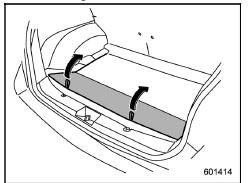
1. Raise and fold the rear end of the cargo floor board.

2. Stow the cover housing in the cargo area end.
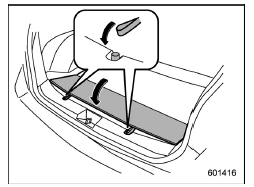
3. Put the cargo floor board back while hanging two retaining straps on the hooks that are located on the rear wall of cargo area.
To install the cover housing
1. Shorten the cover housing
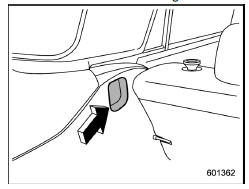
2. Insert both ends of the cover housing into the recesses of the retainers.
 To remove the cover housing
1. Rewind the cover.
2. Push the cover housing to the right
side and shorten it.
3. Take it off the retainer. ...
 Cargo tie-down hooks (if equipped)
The cargo area is equipped with two or
four tie-down hooks so that cargo can be
secured with a cargo net or ropes.
When using the front tie-down hooks, turn
them down out of the storing rece ...
Other materials:
Washing
CAUTION
When washing your Subaru Ascent, be aware that the braking system may
become wet. This can temporarily increase stopping distance. To restore normal
braking performance, drive at a safe speed and gently apply the brakes to generate
heat and dry the components.
Avoid washing th ...
CVT models
1. Apply the parking brake.
2. Turn off unnecessary lights and accessories.
3. Shift the select lever to the "P" or "N"
position (preferably the "P" position).
The starter motor will only operate when
the select lever is at the "P" or "N" position.
4. Turn the ignition switch to the "O ...
Installation
DRIVE SHAFT SYSTEM > Front Hub Unit BearingINSTALLATION1. Place the front brake back plate between the front axle housing and the front hub unit bearing, and tighten the bolt.CAUTION:• Do not get closer the tool which charged magnetism to magnetic encoder.• Be careful not to damage th ...
