
Subaru Crosstrek Owners Manual: Sliding moonroof
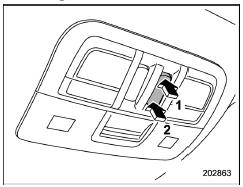
- Open
- Close
To open: Press and hold the rear side of the "OPEN/CLOSE" switch. The sun shade will also be opened together with the moonroof. The moonroof will stop at a position approximately 1.6 in (4 cm) away from the fully opened position. Press and hold the rear side of the switch again to open the moonroof completely.
To close: Press and hold the front side of the "OPEN/CLOSE" switch.
To stop the moonroof at a selected midway position while opening or closing it, momentarily push the switch to the "OPEN" side or "CLOSE" side.
After washing the vehicle or after it rains, wipe away water on the roof prior to opening the moonroof to prevent drops of water from falling into the passenger compartment.
NOTE
Driving with the moonroof fully open can cause an annoying sound to be generated at high speeds. If this occurs, use the moonroof at the initial stop position of 1.6 in (4 cm) away from the fully opened position.
 Tilting moonroof
Raise
Lower
The tilting function is activated only when
the moonroof is fully closed.
To raise:
Press the rear side of the "UP/DOWN"
switch momentarily. The moonroof raises
complete ...
 Anti-entrapment function
When the moonroof senses a substantial
enough object trapped between its glass
and the vehicle's roof during closure, it
automatically moves back to the fully open
position and stops there. The an ...
Other materials:
Operation
EyeSight (DIAGNOSTICS) > ACC Cancel Code(s) DisplayOPERATIONWhen the ACC cancel code is detected from the stereo camera, the cruise control will be cancelled.1. On «Start» display, select «Diagnosis».2. On «Vehicle selection» display, input the target vehicle information and select «Confir ...
Inspection
CONTINUOUSLY VARIABLE TRANSMISSION(TR580) > Oil Pump ChainINSPECTION• Check the oil pump chain for damage.• Replace if gear teeth are broken, damaged, sharpen or excessively worn.• Check the bearing for seizure or wear.• Apply CVTF to bearing and rotate the bearing to chec ...
Removal
LIGHTING SYSTEM > Hazard SwitchREMOVAL1. Disconnect the ground cable from battery. NOTE">2. Remove the center grille assembly. Air Vent Grille > REMOVAL">3. Release the claws, and remove the switch - hazard from the center grille assembly. ...
