
Subaru Crosstrek Owners Manual: Sensor for the auto on/off headlights (if equipped)
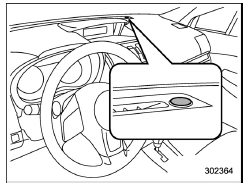
The sensor is on the instrument panel as shown in the illustration.
CAUTION
If any object is placed on or near the sensor, the sensor may not detect the level of the ambient light correctly and the auto on/off headlights may not operate properly.
 Welcome lighting function (if
equipped)
Welcome lighting function (if
equipped)
The welcome lighting function turns on the
low beam headlight for smooth approaching
to or exiting from the vehicle at night or
in a dark place.
The function is activated while all of the
follo ...
 High/low beam change (dimmer)
To change from low beam to high beam,
push the turn signal lever forward. When
the headlights are on high beam, the high
beam indicator light " " on
the combination
meter is also on.
...
Other materials:
Certification for the BSD/RCTA
U.S.-spec. models:
FCC ID: OAYSRR2A
CAUTION
FCC WARNING
Changes or modifications not expressly
approved by the party responsible
for compliance could void
the user's authority to operate the
equipment.
This device complies with part 15 of the
FCC Rules. Operation is subject to the
followi ...
Installation
EMISSION CONTROL (AUX. EMISSION CONTROL DEVICES)(H4DO) > EGR CoolerINSTALLATION1. Set the gasket to the stud bolt.NOTE:Use a new gasket.2. Temporarily tighten the bolts securing the EGR cooler to the EGR control valve and the cylinder head RH, and tighten in numerical order.NOTE:Use a new gasket. ...
Installation
MECHANICAL(H4DO) > Chain CoverINSTALLATION1. Install the O-rings to cylinder head RH, cylinder head LH, cylinder block LH and oil pan upper.NOTE:• Use new O-rings.• Apply a coat of engine oil to the O-rings.2. Apply liquid gasket if there are gaps between front camshaft cap and cam ca ...
