
Subaru Crosstrek Owners Manual: Replacing battery of access key
CAUTION
When removing or reinstalling the access key cover, make sure that the plastic part does not come off or become misaligned.
Battery: Button battery CR2032
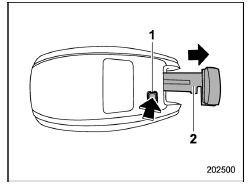
- Release button
- Mechanical key
1. Take out the mechanical key.

2. Wrap a flat-head screwdriver with vinyl tape or a cloth, and insert it in the gap to remove the cover.
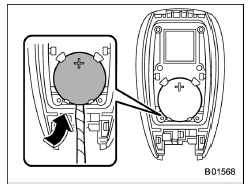
3. Take out the battery using a flat-head screwdriver with vinyl tape or a cloth.
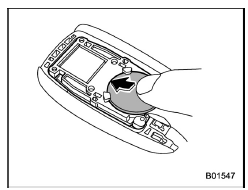
4. Insert a new battery with its positive (+) side facing upward as shown in the figure.
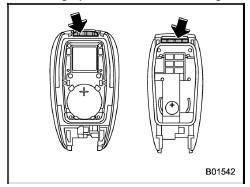
5. Attach the cover to the access key by fitting the projections and recesses together.
 Safety precautions
CAUTION
Do not let dust, oil or water get on
or in the access key/transmitter
when replacing battery.
Be careful not to touch or damage
the printed circuit board in
the access key/transm ...
 Replacing transmitter battery
1. Open the key head using a flat-head
screwdriver.
2. Remove the transmitter case from the
key head.
3. Open the transmitter case by releasing
the hooks.
1) Negative (−) s ...
Other materials:
Dtc c1512 valve system
VEHICLE DYNAMICS CONTROL (VDC) (DIAGNOSTICS) > Diagnostic Procedure with Diagnostic Trouble Code (DTC)DTC C1512 VALVE SYSTEMNOTE:For the diagnostic procedure, refer to “DTC C1362 NORMAL CLOSING VALVE 2”. Diagnostic Procedure with Diagnostic Trouble Code (DTC) > DTC C1362 NORMAL CL ...
Inspection
POWER ASSISTED SYSTEM (POWER STEERING) (DIAGNOSTICS) > Subaru Select MonitorINSPECTION1. COMMUNICATION FOR INITIALIZING IMPOSSIBLEDetecting condition:• Defective harness connector• Defective power steering control moduleTrouble symptom:• Communication is impossible between the p ...
Preparation tool
ENTERTAINMENT > General DescriptionPREPARATION TOOL1. SPECIAL TOOLILLUSTRATIONTOOL NUMBERDESCRIPTIONREMARKS — SUBARU SELECT MONITOR 4Used for setting of each function and troubleshooting for electrical system.NOTE:For detailed operation procedures of Subaru Select Monitor 4, refer to “App ...
