
Subaru Crosstrek Service Manual: Removal
AIRBAG SYSTEM > Front Door Impact Sensor
REMOVAL
CAUTION:
Before handling the airbag system components, refer to “CAUTION” of “General Description” in “AIRBAG SYSTEM”. General Description > CAUTION">
1. Operate the power window switch to close the front door glass.
2. Turn the ignition switch to OFF.
3. Disconnect the ground cable from battery and wait for at least 60 seconds before starting work. NOTE">
4. Remove the trim panel - front door. Door Trim > REMOVAL">
5. Remove the sealing cover. Front Sealing Cover > REMOVAL">
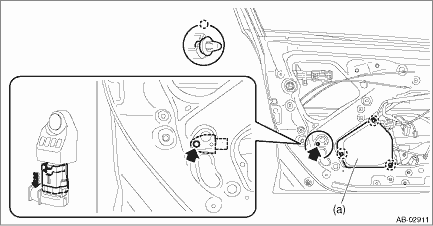
6. Remove the front door impact sensor.
(1) Remove the front door inner pad (a).
CAUTION:
If the clip is damaged, replace it with a new part because the panel assembly - front door may be deformed.
(2) Remove the nuts and then remove the front door impact sensor.
(3) Disconnect the airbag connector and remove the front door impact sensor. Airbag Connector > PROCEDURE">
 Installation
AIRBAG SYSTEM > Front Door Impact SensorINSTALLATIONCAUTION:Do not reuse the bolt and nut.Always replace with the specified new bolts and nuts.1. Before installation, inspect the following items an ...
 Front sub sensor
...
Other materials:
Dtc b1405 scu collation
IMMOBILIZER (DIAGNOSTICS) > Diagnostic Procedure with Diagnostic Trouble Code (DTC)DTC B1405 SCU COLLATIONDTC DETECTING CONDITION:Reference code incompatibility between security control module and body integrated unitCAUTION:When the security control module is replaced, registration of the immobi ...
Dtc u0427 invalid data received from vehicle security control module
LAN SYSTEM (DIAGNOSTICS) > Diagnostic Procedure with Diagnostic Trouble Code (DTC)DTC U0427 INVALID DATA RECEIVED FROM VEHICLE SECURITY CONTROL MODULEDTC DETECTING CONDITION:Defective data was transmitted from keyless access CM.TROUBLE SYMPTOM:Cooperation control of keyless access does not operat ...
Station list
You can select, add or delete a station.
When the tab is touched on the main
screen, a station list will be displayed.
Select to sort the list in the chronological
order of when the Station List was
created.
Select to create a station.
The station can be created using track
...
