
Subaru Crosstrek Service Manual: Removal
AIRBAG SYSTEM > Curtain Airbag Module
REMOVAL
1. CROSSTREK MODEL
CAUTION:
Before handling the airbag system components, refer to “CAUTION” of “General Description” in “AIRBAG SYSTEM”. General Description > CAUTION">
1. Turn the ignition switch to OFF.
2. Disconnect the ground cable from battery and wait for at least 60 seconds before starting work. NOTE">
3. Remove the trim panel - roof assembly. Roof Trim > REMOVAL">
4. Remove the curtain airbag module.
CAUTION:
• Be careful not to damage the curtain airbag module during removal.
• Never open the curtain airbag module before activation. Never reuse the deployed curtain airbag module.
• Remove the modules in order starting from the vehicle front.
(1) Remove all the bolts and clips, and remove the curtain airbag module.
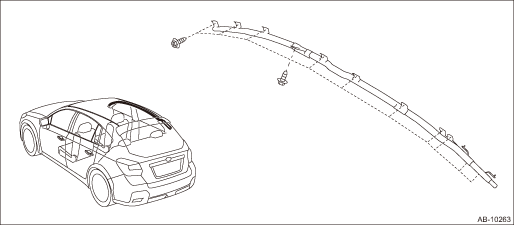
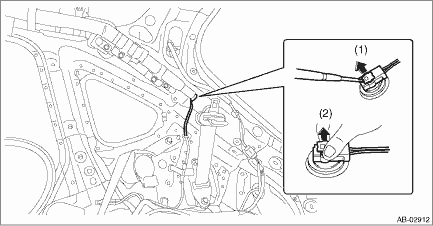
(2) Disconnect the curtain airbag module connector. Airbag Connector > PROCEDURE">
 Installation
AIRBAG SYSTEM > Curtain Airbag ModuleINSTALLATIONCAUTION:• Before handling the airbag system components, refer to “CAUTION” of “General Description” in “AIRBAG S ...

Other materials:
Dtc p2420 evap system switching valve control circuit high
ENGINE (DIAGNOSTICS)(H4DO) > Diagnostic Procedure with Diagnostic Trouble Code (DTC)DTC P2420 EVAP SYSTEM SWITCHING VALVE CONTROL CIRCUIT HIGHDTC detecting condition:Immediately at fault recognitionCAUTION:After servicing or replacing faulty parts, perform Clear Memory Mode Clear Memory Mode > ...
Welcome screen and Good-bye screen
When the driver's door is opened and
closed after unlocking the door, the
welcome screen will appear on the multi
information display for approximately 20
seconds.
When the ignition switch is turned to the
"LOCK"/"OFF" position, the multi information
display gradually turns off (Good-bye
s ...
Component
FRONT SUSPENSION > General DescriptionCOMPONENT1. FRONT SUSPENSION(1)Front crossmember COMPL(14)Bushing rear - front arm(27)Clip(2)Flange bolt(15)Stud bolt (3)Front crossmember support(16)Stopper - front arm bushing rearTightening torque: N·m (kgf-m, ft-lb)(4)Front stabilizer(17)AdapterT1 ...
