
Subaru Crosstrek Service Manual: Removal
FUEL INJECTION (FUEL SYSTEMS)(H4DO) > Fuel Tank
REMOVAL
WARNING:
Place “NO OPEN FLAMES” signs near the working area.
CAUTION:
• Be careful not to spill fuel.
• Catch the fuel from the tubes using a container or cloth.
1. Release the fuel pressure. Fuel > PROCEDURE">
2. Drain fuel. Fuel > PROCEDURE">
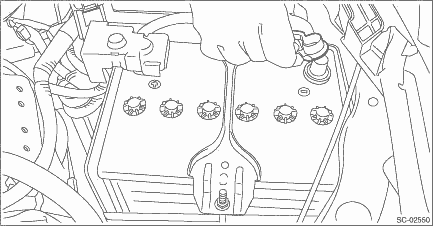
3. Disconnect the ground cable from battery.
4. Remove the rear seat cushion. Rear Seat > REMOVAL">
5. Remove the service hole cover of fuel pump.
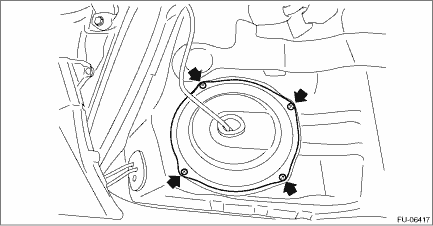
6. Disconnect connectors from the fuel pump, and move aside the service hole cover.

7. Remove the service hole cover of fuel sub level sensor.

8. Disconnect connectors from the fuel sub level sensor, and move aside the service hole cover.
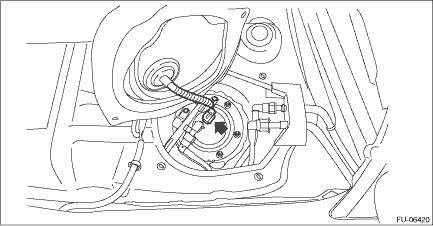
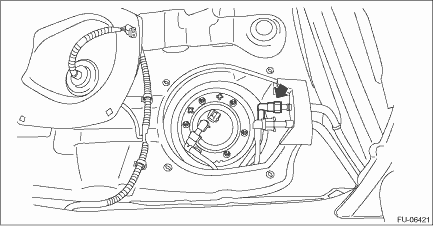
9. Disconnect the quick connector on the fuel delivery tube.
NOTE:
Disconnect the quick connector as shown in the figure.

(a) | Slider |
10. Lift up the vehicle.
11. Remove the rear exhaust pipe and muffler. Rear Exhaust Pipe > REMOVAL"> Muffler > REMOVAL">
12. Remove the rear differential. Rear Differential (T-type) > REMOVAL"> Rear Differential (VA-type) > REMOVAL">
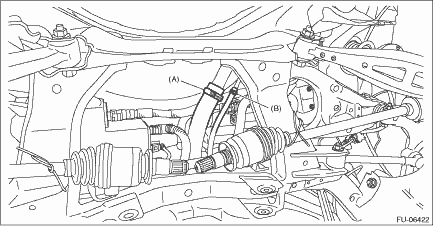
13. Disconnect the fuel filler hose (A) and evaporation hose (B) from the fuel filler pipe assembly.
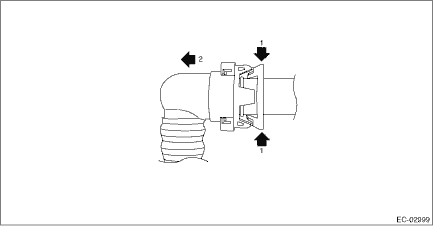
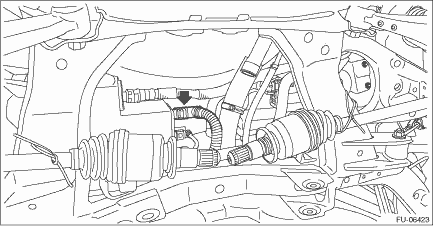
14. Disconnect the vent tube from canister.
NOTE:
Disconnect the quick connector as shown in the figure.
15. Remove the fuel tank protector. Fuel Tank Protector > REMOVAL">
16. Remove the heat shield cover and stopper.
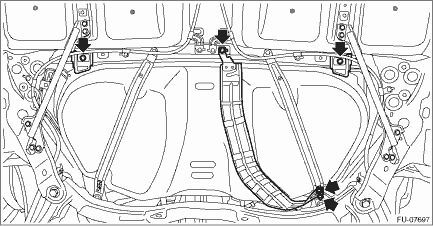
17. Remove the stay - rear frame COMPL.
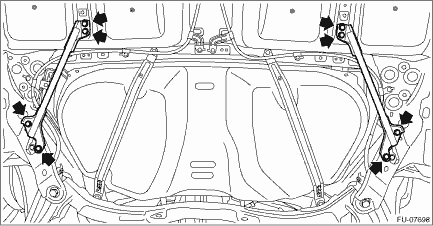
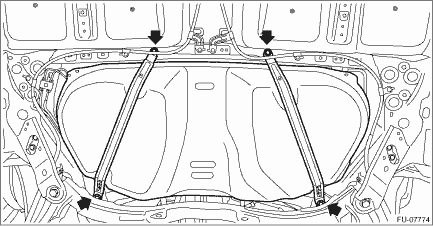
18. Support the fuel tank with a transmission jack, remove the bolts from the fuel tank band, and remove the fuel tank from the vehicle.
WARNING:
• A helper is required to perform this work.
• Fuel may remain in the fuel tank. This will cause the left and right sides to be unbalanced. Be careful not to drop the fuel tank.
 Inspection
FUEL INJECTION (FUEL SYSTEMS)(H4DO) > Fuel TankINSPECTION1. Check that the fuel tank and fuel pipe have no deformation, cracks and other damages.2. Check that the fuel hose and tube have no cracks, ...
 Installation
FUEL INJECTION (FUEL SYSTEMS)(H4DO) > Fuel TankINSTALLATION1. Support the fuel tank with a transmission jack, set the fuel tank in place, and temporarily tighten the bolts of the fuel tank band.WAR ...
Other materials:
Disassembly
FRONT SUSPENSION > Front StrutDISASSEMBLY1. Using a coil spring compressor, compress the coil spring - front.2. Using a hexagon wrench to prevent strut rod from turning, remove the self-locking nut with ST.CAUTION:When installing the coil spring compressor to the coil spring, follow the operation ...
System temporary stop indicator
System temporary stop indicator
This indicator appears when the system is
used under the following conditions.
Extremely high or low temperatures
When abnormal voltage exists for the
vehicle battery
When the radar sensor is significantly
misaligned
Once the above conditions are ...
Symbols in wiring diagrams
WIRING SYSTEM > Basic Diagnostic ProcedureSYMBOLS IN WIRING DIAGRAMSA number of symbols are used in each wiring diagram to easily identify parts or circuits.1. RELAYA symbol used to indicate a relay.2. CONNECTOR 1The sketch of the connector indicates the one-pole types.3. WIRING CONNECTIONSome wi ...
