
Subaru Crosstrek Service Manual: Removal
CONTROL SYSTEMS > MT Gear Shift Lever
REMOVAL
1. Disconnect the ground cable from battery. NOTE">
NOTE:
For model with battery sensor, disconnect the ground terminal from battery sensor.
2. Remove the console box. Console Box > REMOVAL">
3. Remove the gear shift knob and remove the cover - shift lever.
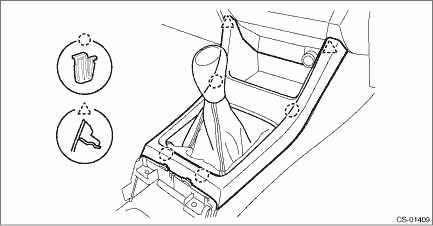
4. Remove the panel center LWR LH and RH. Console Box > REMOVAL">
5. Remove the clamp.
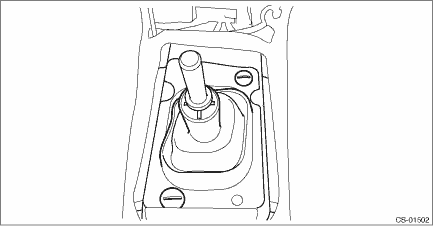
6. Remove the boot and insulator assembly.
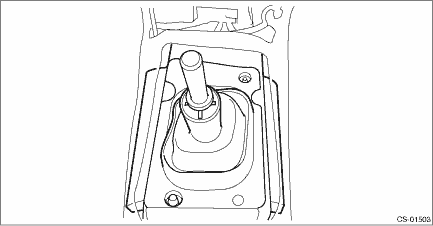
7. Remove the harness clamp from the plate COMPL.
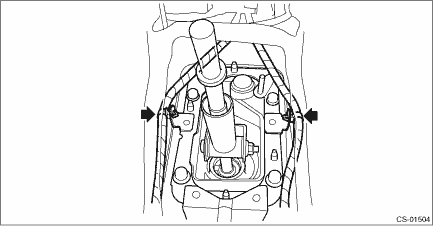
8. Remove the plate COMPL from the vehicle body.
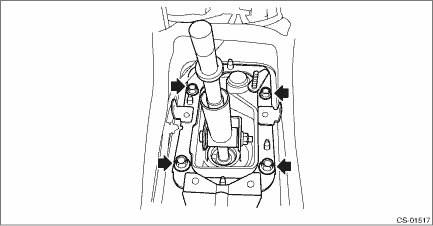
9. Lift up the vehicle.
10. Remove the center exhaust pipe. Center Exhaust Pipe > REMOVAL">
11. Remove the center exhaust cover.
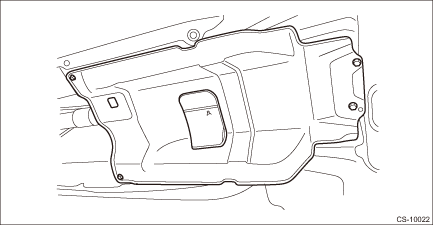
12. Remove the stay from the shift bracket.
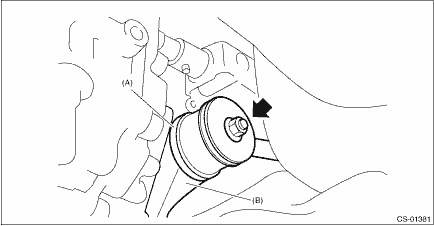
(A) | Stay |
(B) | Shift bracket |
13. Remove the rod from joint.
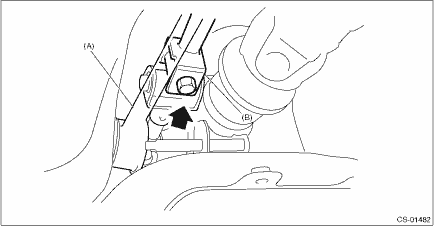
(A) | Stay |
(B) | Rod |
14. Remove the cushion rubber from the vehicle body.
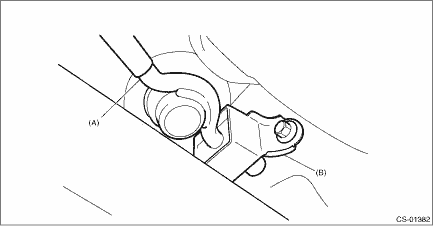
(A) | Stay |
(B) | Cushion rubber |
15. Extract the spring pin and remove the joint.
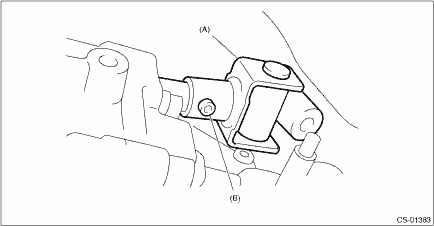
(A) | Joint |
(B) | Spring pin |
16. Lower the vehicle.
17. Remove the gear shift lever.
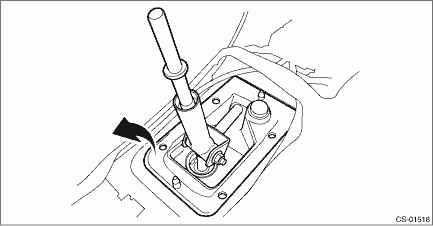
 Assembly
CONTROL SYSTEMS > MT Gear Shift LeverASSEMBLYNOTE:• Clean all the parts before assembly.• Apply NIGTIGHT LYW No. 2 grease or equivalent to each part. General Description > COMPONENT ...
 Disassembly
CONTROL SYSTEMS > MT Gear Shift LeverDISASSEMBLY1. Remove the lock wires.(A)Lock wire2. Remove the rod from gear shift lever.(A)Rod(B)Lever(C)Stay3. Separate the rod and inner boot.4. Remove the sn ...
Other materials:
Dtc p000b "b" camshaft position slow response bank 1
ENGINE (DIAGNOSTICS)(H4DO) > Diagnostic Procedure with Diagnostic Trouble Code (DTC)DTC P000B "B" CAMSHAFT POSITION SLOW RESPONSE BANK 1NOTE:For the diagnostic procedure, refer to DTC P0014. Diagnostic Procedure with Diagnostic Trouble Code (DTC) > DTC P0014 "B" CAMSHAFT P ...
Inspection
GLASS/WINDOWS/MIRRORS > Front Regulator and Motor AssemblyINSPECTION1. Disconnect the connector of the motor - front.2. Check the motor operation when battery voltage is applied between terminals of the motor - front connector.• LH sideTerminal No.Inspection conditionsStandard4 (+) — 1 (& ...
Dtc p0390 camshaft position sensor "b" circuit bank 2
ENGINE (DIAGNOSTICS)(H4DO) > Diagnostic Procedure with Diagnostic Trouble Code (DTC)DTC P0390 CAMSHAFT POSITION SENSOR "B" CIRCUIT BANK 2DTC DETECTING CONDITION:Immediately at fault recognitionTROUBLE SYMPTOM:• Engine stall• Failure of engine to startCAUTION:After servicing ...
