
Subaru Crosstrek Service Manual: Removal
CONTROL SYSTEMS > AT Shift Lock Solenoid and “P” Range Switch
REMOVAL
1. SOLENOID UNIT
1. Remove the AT select lever. Select Lever > REMOVAL">
2. Remove the spacer and gasket. Select Lever > DISASSEMBLY">
3. Using a flat tip screwdriver with a thin tip, remove the harness connector from the plate COMPL.
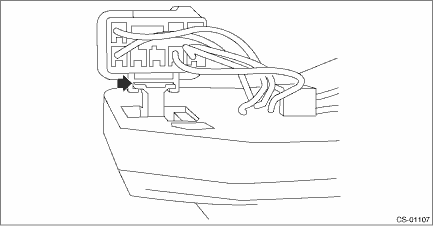
4. Raise the claw using a flat tip screwdriver with a thin tip, and remove the solenoid unit from the plate COMPL.
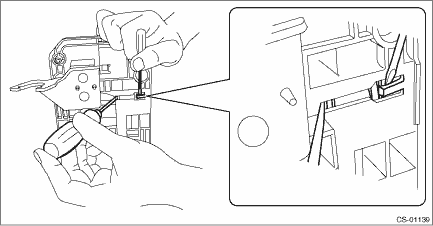
5. Remove the terminal of the solenoid unit using a flat tip precision screwdriver with a tip width of 1.3 mm (0.05 in) or less, KTC connector terminal tool ECC-1T or equivalent.
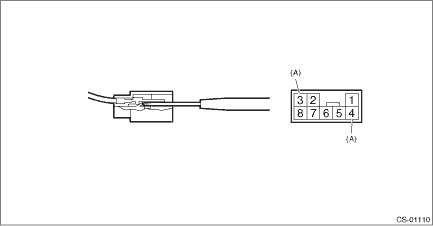
(A) | Solenoid unit terminals |
2. “P” RANGE SWITCH
For the removal of “P” range switch, refer to the procedure for AT select lever. Select Lever > DISASSEMBLY">
 Inspection
CONTROL SYSTEMS > AT Shift Lock Solenoid and “P” Range SwitchINSPECTIONSTEPCHECKYESNO1.CHECK SOLENOID UNIT.Measure the resistance of solenoid unit connector terminals.TerminalsNo. 4 — ...
 Installation
CONTROL SYSTEMS > AT Shift Lock Solenoid and “P” Range SwitchINSTALLATIONInstall in the reverse order of removal.NOTE:Insert the solenoid unit terminals to the harness connector.(A)Sole ...
Other materials:
Dtc b28a7 stereo camera recognition(target)
EyeSight (DIAGNOSTICS) > Diagnostic Procedure with Diagnostic Trouble Code (DTC)DTC B28A7 STEREO CAMERA RECOGNITION(TARGET)Detected when error occurs in the communication data inside the control module caused by external factors such as noises.NOTE:If the same DTC is still detected after the engi ...
Removal
MANUAL TRANSMISSION AND DIFFERENTIAL(5MT) > Shifter Fork and RodREMOVAL1. Remove the manual transmission assembly from the vehicle. Manual Transmission Assembly > REMOVAL">2. Remove the back-up light switch and the neutral position switch. Switches and Harness > REMOVAL">3 ...
Dtc p0196 engine oil temperature sensor "a" range/performance
ENGINE (DIAGNOSTICS)(H4DO) > Diagnostic Procedure with Diagnostic Trouble Code (DTC)DTC P0196 ENGINE OIL TEMPERATURE SENSOR "A" RANGE/PERFORMANCEDTC DETECTING CONDITION:Detected when two consecutive driving cycles with fault occur.TROUBLE SYMPTOM:• Hard to start• Improper id ...
