
Subaru Crosstrek Service Manual: Removal
CONTINUOUSLY VARIABLE TRANSMISSION(TR580) > CVTF Cooler (With Warmer Function)
REMOVAL
CAUTION:
If the CVTF and engine coolant is spilt over exhaust pipe, wipe it off with cloth to avoid emitting smoke or causing a fire.
1. Disconnect the ground cable from battery. NOTE">
NOTE:
For model with battery sensor, disconnect the ground terminal from battery sensor.
2. Drain engine coolant. Engine Coolant > REPLACEMENT">
3. Remove the clip (A) from the air intake boot.
4. Loosen the clamp (B) connecting the air intake boot and air cleaner case (rear).
5. Loosen the clamp (C) which connects the air intake boot and throttle body.

6. Remove the air intake boot from the throttle body, and move it to the left side wheel apron.
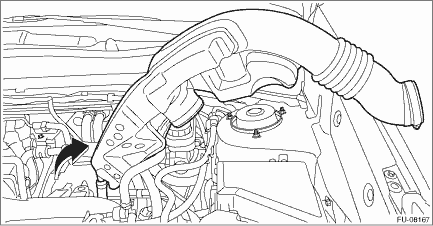
7. Remove the harness bracket, and then remove the engine harness.
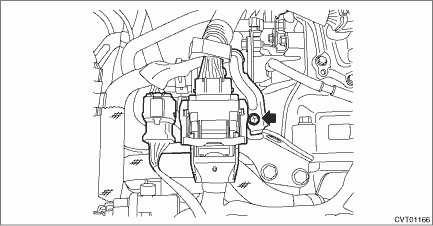
8. Disconnect the EGR control valve harness connector, throttle position sensor harness connector and manifold absolute pressure sensor harness connector.
9. Remove the engine hanger rear.
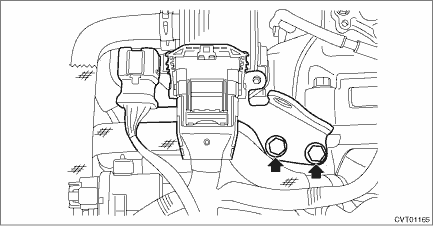
10. Remove the engine coolant outlet hose.
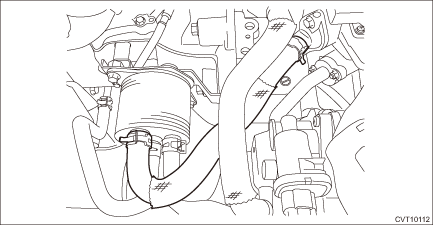
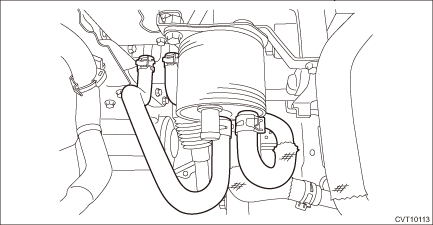
11. Remove the CVTF inlet hose and outlet hose.
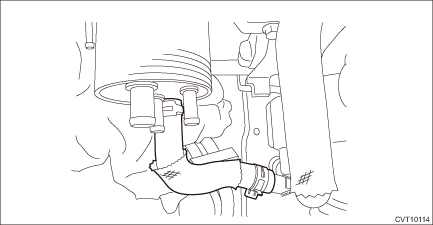
12. Remove the engine coolant inlet hose.
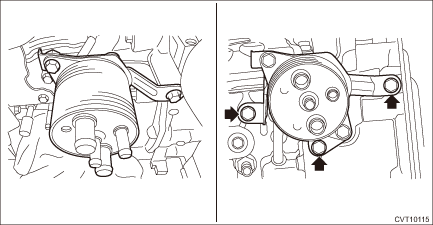
13. Remove the CVTF cooler (with warmer feature) from the transmission.
 Assembly
CONTINUOUSLY VARIABLE TRANSMISSION(TR580) > CVTF Cooler (With Warmer Function)ASSEMBLY1. Attach the bracket.Tightening torque:23 N·m (2.3 kgf-m, 17.0 ft-lb) ...
 Disassembly
CONTINUOUSLY VARIABLE TRANSMISSION(TR580) > CVTF Cooler (With Warmer Function)DISASSEMBLY1. Remove the bracket from the CVTF cooler (with warmer feature). ...
Other materials:
Engine oil pressure Inspection
MECHANICAL(H4DO) > Engine Oil PressureINSPECTION1. Disconnect the ground cable from battery. NOTE">2. Remove the oil pressure switch. Oil Pressure Switch > REMOVAL">3. Install the oil pressure gauge to the chain cover.4. Connect the battery ground terminal. NOTE">5. ...
Menu screens
Pull the "
/SET" switch to enter the menu
screens when all of the following conditions
are satisfied.
The vehicle has been completely
stopped.
The select lever is in the "P" position.
The menu screen entering screen is
selected.
The "
" information reminder is off.
Th ...
Inspection
DRIVE SHAFT SYSTEM > Propeller ShaftINSPECTIONCheck the propeller shaft with the propeller shaft installed to the vehicle.1. Remove the front exhaust pipe. Front Exhaust Pipe > REMOVAL">2. Remove the center exhaust pipe, rear exhaust pipe, and muffler.• Center exhaust pipe & ...
