
Subaru Crosstrek Service Manual: Removal
CLUTCH SYSTEM > Release Bearing and Lever
REMOVAL
1. Remove the transmission assembly from the vehicle.
Manual Transmission Assembly > REMOVAL">
2. Remove the two clips from the release lever and remove the release bearing.
CAUTION:
Be careful not to deform the clips.
3. Remove the dust cover.
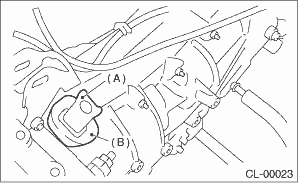
(A) | Release lever |
(B) | Dust cover |
4. Remove the attachment point of lever spring by inserting a screwdriver through the clutch housing release lever hole. Then remove the release lever.
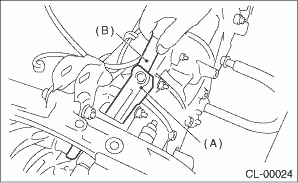
(A) | Release lever |
(B) | Screwdriver |
 Inspection
CLUTCH SYSTEM > Release Bearing and LeverINSPECTION1. RELEASE BEARINGCAUTION:Since this bearing is grease-sealed and is a non-lubrication type, do not wash with gasoline or any other solvent when s ...
 Installation
CLUTCH SYSTEM > Release Bearing and LeverINSTALLATIONNOTE:Apply the specified grease to lubricate to the following points before installation.• Contact surface of lever and pivot• Conta ...
Other materials:
BSD/RCTA
The Subaru Ascent BSD/RCTA system integrates advanced rear corner radar technology,
combining Blind Spot Detection and Rear Cross Traffic Alert to enhance driver awareness
in critical situations.
These intelligent safety features continuously monitor the rear and side zones
of the Subaru Asce ...
Fog light switch
Headlight switch
Fog light switch
The front fog lights will turn on when the
fog light switch is placed in the "
"
position while the headlights are in the
following condition.
while the headlight switch is in the "
"
position
for models with the auto on/off h ...
Bulb chart
NOTE
Lights A and B are the LED (Light Emitting Diode) type. Consult your
SUBARU dealer for replacement.
Wattage
Bulb No.
1) High beam headlight
12V-60W
HB3
2) Low beam headlight
Models with HID light
Models with halogen light
...
