
Subaru Crosstrek Owners Manual: Receiving a call
Incoming calls
When a call is received, the incoming call screen is displayed with a sound.
When you receive a phone call while the cell phone is connected, the screen changes to the incoming call screen.
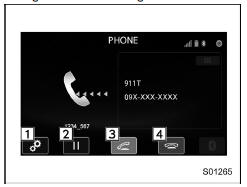
Incoming call screen
- Open the "Options" screen. Refer to "Phone volume settings"
- Put the incoming call on hold. This function may not work on some cell phone models. This function is the same as pressing the on hook switch on the steering wheel for a short period of time.
- Open the call screen. This function is the same as pressing the off hook switch on the steering wheel.
- Reject the incoming call. This function is the same as pressing and holding the on hook switch on the steering wheel.
NOTE
- During international phone calls, the other party's name or number may not be displayed correctly depending on the type of cell phone you have.
- The ringtone that has been set in the phone setting screen sounds when there is an incoming call. Depending on the type of Bluetooth phone, both the system and Bluetooth phone may sound simultaneously when there is an incoming call. Refer to "Phone volume settings"
By off/on hook switch
When you receive a call, you can also answer it by pressing the off hook switch on the steering wheel. To end a call, press the on hook switch.
 Outgoing screen
Outgoing call screen
Open the "Options" screen. Refer to
"Phone volume settings"
Abort the call. The screen returns to
the phone (menu) screen. This is the
same as pressing the on hook ...
 Talking on the phone
The call screen opens when you perform
the following operations.
When you accept a call on the incoming
call screen (by selecting the
key),
the call screen opens.
When you are on ...
Other materials:
Reverse function
WARNING
Keep all body parts clear when operating the Subaru Ascent reverse function.
If the system fails to react properly, serious injury may occur.
The Subaru Ascent reverse function may not activate if an object is trapped
just before the rear gate fully closes. Always exercise cautio ...
Remote start safety features
For safety and security reasons, the
remote engine start system will prevent
starting (or stop the engine if running) and
sound the horn twice if any of the following
conditions is detected. In addition, the fob
will flash and beep 3 times.
The brake pedal is depressed
A key is in the ign ...
Specification
CONTROL SYSTEMS > General DescriptionSPECIFICATIONItemSpecificationsSwing torque of rod against leverN (kgf, lb)3.7 (0.38, 0.83) or less ...
