
Subaru Crosstrek Owners Manual: Rear combination lights
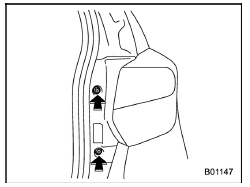
1. Using a Phillips screwdriver, remove the upper and lower screws that secure the rear combination light assembly.
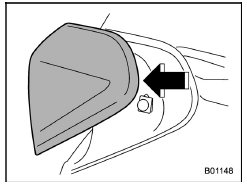
2. Slide the rear combination light as- 11-38 sembly rearward and remove it from the vehicle.
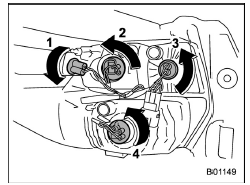
- Rear side marker light
- Rear turn signal light
- Backup light
- Stop light/Tail light
3. Remove the bulb socket from the rear combination light assembly by turning it counterclockwise.
4. Pull the bulb out of the bulb socket and replace it with a new one.
5. Set the bulb socket into the rear combination light assembly and turn it clockwise until it locks.
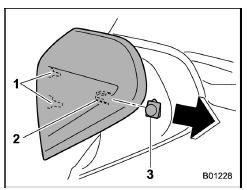
- Guide pins
- Catch
- Clip
6. Put the rear combination light assembly into place while aligning the 2 guide pins and a catch with the guide holes and a clip on the vehicle.
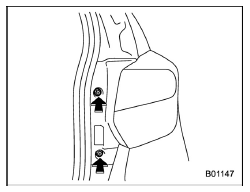
7. Tighten the upper and lower screws.
 Headlights (models without HID headlights)
CAUTION
Halogen headlight bulbs become
very hot while in use. If you touch
the bulb surface with bare hands or
greasy gloves, fingerprints or
grease on the bulb surface will
develop into hot spo ...
 License plate light
1. The license plate light must be pushed
inwards, then pulled out to be removed.
2. Turn the bulb socket counterclockwise
and pull out the socket.
3. Pull the bulb out of the socket.
4 ...
Other materials:
Installation
PARKING BRAKE > Parking Brake Assembly (Rear Disc Brake)INSTALLATIONCAUTION:Be sure the lining surface is free from brake fluid and grease.1. Apply brake grease to the following locations.Preparation items:Brake grease: Dow Corning Molykote 44MA or equivalent• Six contact surfaces of the pa ...
Installation
CONTINUOUSLY VARIABLE TRANSMISSION(TR580) > Primary Pulley and Secondary PulleyINSTALLATION1. Select shims for pulley alignment. Primary Pulley and Secondary Pulley > ADJUSTMENT">2. Install the seal ring to the input shaft.NOTE:• Use new seal rings.• When installing the se ...
Removal
LIGHTING SYSTEM > Ignition Switch IlluminationREMOVALNOTE:The ignition switch illumination is integrated into the immobilizer antenna assembly.1. Disconnect the ground cable from battery. NOTE">2. Remove the cover assembly - column.(1) Remove the screws by turning the steering wheel to r ...
