
Subaru Crosstrek Owners Manual: Profiles
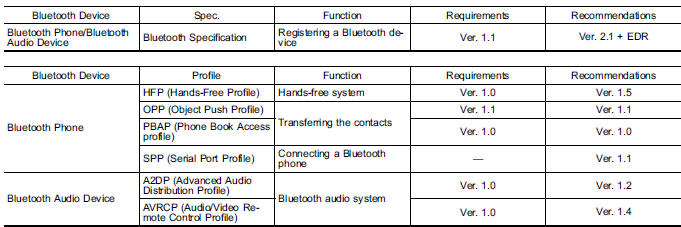
This system supports the following services.
NOTE
- If your cell phone does not support HFP, registering the Bluetooth phone or using OPP, PBAP, or SPP profiles individually will not be possible.
- If the connected Bluetooth device version is older than recommended or incompatible, the Bluetooth device function may not work properly.
- For USA customers, please visit www.subaru.com for details. Outside of the USA customers, contact your local dealer to arrange a demonstration in order to confirm whether or not the device can be paired with the vehicle.
 Registering a Bluetooth Audio device for the first time
To use the Bluetooth Audio, it is necessary
to register an audio device with the
system.
The device registration procedure is the
same for both the hands-free system and Bluetooth audio.
1. Dis ...

Other materials:
Defrosting
Type A and B
Select the "
" or "
" mode by turning the
airflow mode selection dial to defrost or
dehumidify the windshield and front door
windows.
Type C
Select the "
" mode by pressing the
defroster button, or select the "
" mode
by turning the airflow mode selec ...
Dtc c0052 motor malfunction
VEHICLE DYNAMICS CONTROL (VDC) (DIAGNOSTICS) > Diagnostic Procedure with Diagnostic Trouble Code (DTC)DTC C0052 MOTOR MALFUNCTIONDTC detecting condition:• Defective motor and motor relay• Defective harness connectorTrouble symptom:• ABS does not operate.• VDC does not oper ...
Dtc c1562 reverse on fault
VEHICLE DYNAMICS CONTROL (VDC) (DIAGNOSTICS) > Diagnostic Procedure with Diagnostic Trouble Code (DTC)DTC C1562 REVERSE ON FAULTDTC detecting condition:Abnormal reverse signalTrouble symptom:Hill start assist does not operate.Wiring diagram:Back-up light system Back-up Light System">CAN ...
