
Subaru Crosstrek Owners Manual: Presetting a station
In total 18 stations can be set for the FM band (6 each for FM1, FM2 and FM3) and 12 stations can be set for the AM band (6 each for AM1 and AM2).
1. Tune in the desired station.
2. If you touch and hold a key, the system stores the frequency to the selected preset channel.
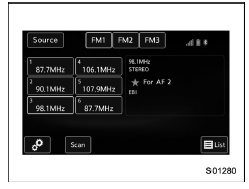
 Control screen and audio panel
Select to display the audio source
selection screen.
Select to change the band.
The HD Radio indicator on the top
right of the screen changes according
to the reception condition of H ...
 Selecting a station from the list (if equipped)
A station list can be displayed.
1. Touch the tab.
2. Touch the tab and the station
list will
appear.
3. Select the desired station.
Update the station list
Touch the "Update S ...
Other materials:
Inspection
VEHICLE DYNAMICS CONTROL (VDC) > VDC Control Module and Hydraulic Control Unit (VDCCM&H/U)INSPECTION1. Check the identification (a) of the VDC control module & hydraulic control unit (VDCCM&H/U).NOTE:For the identification, refer to “SPECIFICATION” in “General Descri ...
Dtc u0422 invalid data received from body control module
CONTINUOUSLY VARIABLE TRANSMISSION (DIAGNOSTICS) > Diagnostic Procedure with Diagnostic Trouble Code (DTC)DTC U0422 INVALID DATA RECEIVED FROM BODY CONTROL MODULENOTE:Refer to “LAN SYSTEM (DIAGNOSTICS)” for diagnostic procedures. Basic Diagnostic Procedure">1. OUTLINE OF DIAG ...
Tips
The system can be armed even if the
engine hood, windows and/or moonroof
are open. Always make sure that they are
fully closed before arming the system.
The 30-second standby time can be
eliminated if you prefer. Have it performed
by your SUBARU dealer.
The system is in the standby ...
