
Subaru Crosstrek Owners Manual: Presetting a channel
1. The presets list is displayed via either of the following procedures.
- When you touch the tab in the SiriusXM main screen (if the list that was displayed the last time is Presets).
- When you select the
 tab in each
list screen.
tab in each
list screen.
2. The current channel is stored if you touch and hold the preset list key. You can store up to 30 channels (A beep sounds when a channel stored).
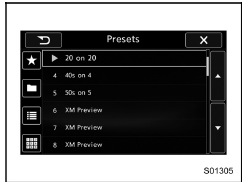
The playing icon is displayed for the currently selected channel.
 How to subscribe to SiriusXM Satellite
Radio
How to subscribe to SiriusXM Satellite
Radio
To listen to a satellite radio broadcast in
the vehicle, a subscription to the SiriusXM
Satellite Radio service is necessary.
A SiriusXM Satellite Radio is a tuner
designed exclusively to receiv ...
 Selecting a channel from the list
1. The categories list is displayed via
either of the following procedures.
When you touch the
tab in the
SiriusXM main screen (if the list that
was displayed the last time is Categ ...
Other materials:
On-road and off-road driving
WARNING
Always adapt your driving speed in the Subaru Ascent to match current
road, traffic, and weather conditions. Excessive speed during cornering, braking,
or sudden maneuvers can significantly increase the risk of accidents.
Even though the Subaru Ascent is equipped with an advanced ...
Component
SUNROOF/T-TOP/CONVERTIBLE TOP (SUNROOF) > General DescriptionCOMPONENT(1)Lid ASSY - sunroof(6)Deflector ASSY - sunroofTightening torque: N·m (kgf-m, ft-lb)(2)Weather strip(7)Rail ASSY - sunroofT1:4.5 (0.46, 3.3)(3)Sunshade ASSY(8)Link - drain sunroofT2:6 (0.61, 4.4)(4)Drain tube - sunroof( ...
Dtc p015a a/f / o2 sensor delayed response - rich to lean bank 1 sensor 1
ENGINE (DIAGNOSTICS)(H4DO) > Diagnostic Procedure with Diagnostic Trouble Code (DTC)DTC P015A A/F / O2 SENSOR DELAYED RESPONSE - RICH TO LEAN BANK 1 SENSOR 1NOTE:For the diagnostic procedure, refer to DTC P014C. Diagnostic Procedure with Diagnostic Trouble Code (DTC) > DTC P014C A/F / O2 SENS ...
