
Subaru Crosstrek Owners Manual: Preparation for car settings
1. Turn the ignition switch to the "ON" position.
2. Push and hold the  button to
show
the selection screen.
button to
show
the selection screen.
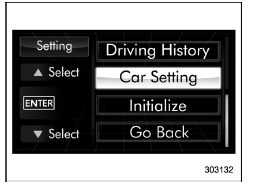
3. After the selection screen is displayed,
operate the "  " or "
 " switch to show the
"Car Setting" item. Then, push the
" switch to show the
"Car Setting" item. Then, push the  button.
 Car settings
The items in the car settings can be set.
To change the items, operate the "
" or
" " switch, and then push the
button. ...
 Keyless buzzer volume setting
1. Perform the preparation steps according
to "Preparation for car settings"
2. Operate the " " or "
" switch to
select the "Keyless Buzzer Volume" item.
Then push the button.
...
Other materials:
Information bar
Information bar
Outside temperature indicator
Top display
Clock
While the ignition switch is in the "ACC" or
"ON" position, the outside temperature
indicator, clock, etc. will be shown on the
information bar.
Outside temperature indicator
This displays the outside temperature
b ...
Dtc p0708 transmission range sensor "a" circuit high
CONTINUOUSLY VARIABLE TRANSMISSION (DIAGNOSTICS) > Diagnostic Procedure with Diagnostic Trouble Code (DTC)DTC P0708 TRANSMISSION RANGE SENSOR "A" CIRCUIT HIGHDTC detecting condition:Immediately at fault recognitionTrouble symptom:• Shift characteristics are erroneous.• The r ...
Starting engine
WARNING
There are some general precautions
when starting the engine.
Carefully read the precautions
described in "General precautions
when starting/stopping engine"
F7-9.
If the indicator on the pushbutton
ignition switch flashes in
green after the engine has
started, never dri ...
