
Subaru Crosstrek Owners Manual: Outside mirrors
Convex mirror (passenger side)
WARNING
Objects look smaller in a convex mirror and farther away than when viewed in a flat mirror. Do not use the convex mirror to judge the distance of vehicles behind you when changing lanes. Use the inside mirror (or glance backwards) to determine the actual size and distance of objects that you view in convex mirror.
Remote control mirror switch
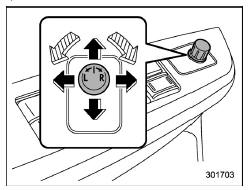
 Select side to adjust
 Direction control
The remote control mirrors operate only when the ignition switch is in the "ON" or "ACC" position.
1. Turn the control switch to the side that you want to adjust. "L" is for the left mirror, "R" is for the right mirror.
2. Move the control switch in the direction you want to move the mirror.
3. Return the control switch to the neutral position to prevent unintentional operation.
The mirrors can also be adjusted manually.
 Inside mirror
The inside mirror has a day and night
position. Pull the tab at the bottom of the
mirror toward you for the night position.
Push it away for the day position. The
night position reduces glar ...
 Defogger and deicer
Rear window defogger
Outside mirror defogger (if equipped)
Windshield wiper deicer (if equipped)
The vehicle is equipped with a rear
window defogger. Some models are also
equipped with ...
Other materials:
Vehicle Dynamics Control warning light/ Vehicle Dynamics Control operation indicator
light
Vehicle Dynamics Control warning light
CAUTION
In the Subaru Ascent, the Vehicle Dynamics Control (VDC) system relies on
the ABS through a shared electrical circuit. If the ABS system becomes inoperative
for any reason, the VDC system will also lose its ability to provide ABS-related
control ...
Removal
MANUAL TRANSMISSION AND DIFFERENTIAL(5MT) > Reverse Idler GearREMOVAL1. Remove the manual transmission assembly from the vehicle. Manual Transmission Assembly > REMOVAL">2. Remove the back-up light switch and the neutral position switch. Switches and Harness > REMOVAL">3. ...
Electrical specification
EyeSight (DIAGNOSTICS) > Control Module I/O SignalELECTRICAL SPECIFICATION1. STEREO CAMERATerminal No.ContentMeasuring conditionStandard(R137) No. 1 — — — (R137) No. 2 — — — (R137) No. 3 — — — (R137) No. 4 — — — (R137) No. 5 — — — (R137) No. 6 ←> Ch ...
