
Subaru Crosstrek Owners Manual: Operating the driver's window
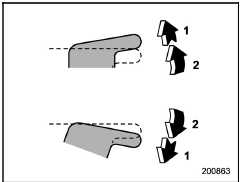
- Automatically open/close
- Open/close
To open: Push the switch down lightly and hold it.
The window will open as long as the switch is held.
This switch also has a one-touch auto down function. To open the window fully, push the switch down until it clicks and then release it. To stop the window halfway, pull the switch up lightly.
To close: Pull the switch up lightly and hold it. The window will close as long as the switch is held.
This switch also has a one-touch auto up function. To close the window fully, pull the switch up until it clicks and then release it.
To stop the window halfway, push the switch down lightly.
NOTE
If the vehicle's battery is disconnected due to situations such as battery or fuse replacement, the onetouch auto up/down function will be deactivated. Initialize the power window to reactivate the one-touch auto up/down function. Refer to "Initialization of power window" 2-37.
When the following operations are performed, the power window breaker will operate and it may not be possible to open or close the window.
- After the driver's window is fully closed or fully opened, the switch is continuously operated in the same direction for a few seconds.
- After the windows for three or more seats are fully closed or fully opened, each switch is continuously operated in the same direction simultaneously for a few seconds.
In this case, after the breaker recovers, be sure to initialize the power windows.
If they are not initialized, the one-touch auto up/down function will not operate.
Refer to "Initialization of power window" 2-37.
 Driver's side power window switches
Lock switch
For driver's window (with one-touch auto
up and down feature)
For front passenger's window
For rear left window
For rear right window
All door windows can be controlled ...
 Anti-entrapment function
CAUTION
Never attempt to test this function
using fingers, hands or other
parts of your body.
The anti-entrapment function
may not operate properly if some
object gets trapped just befor ...
Other materials:
Installation
ENTERTAINMENT > Switches and HarnessINSTALLATION1. SATELLITE SWITCH ASSEMBLYCAUTION:• Before handling the airbag system components, refer to “CAUTION” of “General Description” in “AIRBAG SYSTEM”. General Description > CAUTION">• Do not a ...
Caution
GLASS/WINDOWS/MIRRORS > General DescriptionCAUTION• Before disassembling or reassembling parts, always disconnect the battery ground cable from battery. When replacing the audio, control module and other parts provided with memory functions, record the memory contents before disconnecting t ...
Models without multi function display
NOTE
For models with information display
(black and white), refer to "Information
display"
The U.S.-spec models are not equipped
with the multi function display. The other
models may be equipped with the multi
function display or not, depending on the
model.
Safety precautions
WARNING
Alw ...
