
Subaru Crosstrek Owners Manual: Operating ranges
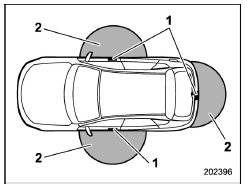
- Antenna
- Operating range
- The operating range of the door locking/ unlocking function is approximately 16 to 32 in (40 to 80 cm) from the respective door handle.
- The operating range of the rear gate locking/unlocking function is approximately 16 to 32 in (40 to 80 cm) from the rear gate ornament.
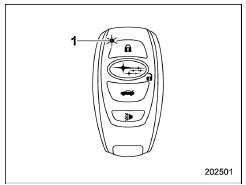
- LED indicator
When the access key is within either of the operating ranges of the front doors, the LED indicator on the access key flashes.
When the keyless access functions are disabled, the LED indicator does not flash unless a button on the access key is pressed.
Operating range tips Regarding malfunction:
The keyless access function may not operate properly due to the following reasons.
- The access key is placed too close to the vehicle body (in this case, repeat the operation from further away).
- The access key is placed near the ground or in an elevated location from the ground, even if it is in the indicated operating range.
- The status of the access key and the radio wave conditions around the vehicle (e.g., access key battery discharge) (in this case, perform the procedure described in "Locking and unlocking" 9- 17).
Precautions:
When the access key is within the operating range, it is possible for anyone, even someone who is not carrying the access key, to operate the keyless access function. Please note that the keyless access function is only available for the following items when the access key is detected within operating range.
- Door handle
- Door lock sensor
- Rear gate opener button
- Rear lock button
It is not possible to lock the doors and rear gate using the keyless access function when the access key is inside the vehicle. However, depending on the status of the access key and the environmental conditions, the access key may be locked inside the vehicle. Before locking the doors and rear gate, make sure that you have the access key.
The operating range may be reduced, or the keyless access function may not operate in the following cases:
- When the battery of the access key is discharged
- When the access key is in a location with strong radio waves or noise (e.g., near a radio tower, power plant, broadcast station or an area where wireless equipment is used)
- While talking on a cell phone
In such a case, perform the procedure described in "Locking and unlocking" 9-17.
When an access key is in the operating range, if the door handle becomes wet due to exposure to a significant amount of water when the vehicle is washed or during heavy rain, the doors may be locked or unlocked.

 How to use keyless access functions
Keyless access function tips
Turn off the push-button ignition switch
before locking the doors (including rear
gate) using the keyless access function. It
is not possible to lock the doors ( ...
Other materials:
Dtc b1906 open in front p/t lh
AIRBAG SYSTEM (DIAGNOSTICS) > Diagnostic Chart with Trouble CodeDTC B1906 OPEN IN FRONT P/T LHDiagnosis start condition:Ignition voltage is 10 V to 16 V.DTC detecting condition:• Seat belt pretensioner (LH) circuit is open.• Pretensioner (LH) is faulty.• Pretensioner harness (LH ...
Operation
ENTERTAINMENT > Navigation SystemOPERATION1. SUBARU STARLINK CONNECTION ID DISPLAY1. Turn the ignition switch to ACC.2. Press the AUDIO/TUNE knob (b) five times with the HOME button (a) pressed to display the {Service Menu} screen.3. Touch the {Product Information} (c) to display the {Product Inf ...
Installation
GLASS/WINDOWS/MIRRORS > Windshield GlassINSTALLATIONCAUTION:• For model with EyeSight, always use Subaru genuine windshield glass specially designed for EyeSight. (If the windshield glass other than the glass specially designed for EyeSight is used, the visibility of the camera is blocked o ...
