
Subaru Crosstrek Owners Manual: Map light
Type A
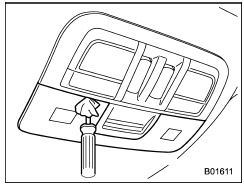
1. Remove the lens by prying the edge of the lens with a flat-head screwdriver.
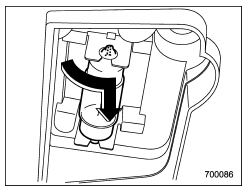
2. Turn the bulb until the flat surfaces at its ends are aligned vertically. Pull the bulb straight downward to remove it.
3. Install a new bulb.
4. Reinstall the lens.
Type B
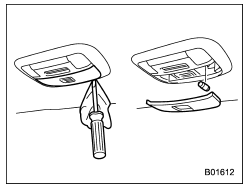
1. Remove the lens by prying the edge of the lens with a flat-head screwdriver.
2. Pull the bulb out of the socket.
3. Install a new bulb.
4. Reinstall the lens.
 License plate light
1. The license plate light must be pushed
inwards, then pulled out to be removed.
2. Turn the bulb socket counterclockwise
and pull out the socket.
3. Pull the bulb out of the socket.
4 ...
 Dome light and cargo area light
Dome light
Cargo area light
1. Remove the lens by prying the edge of
the lens with a flat-head screwdriver.
2. Pull the bulb out of the socket.
3. Install a new bulb.
4. Reinstall th ...
Other materials:
Inspection
HVAC SYSTEM (HEATER, VENTILATOR AND A/C) > Blower Resistor (Manual A/C Model)INSPECTION1. Check the resistance between resistor terminals.Preparation tool:Circuit testerTerminal No.StandardConnection diagram4 — 3Approx. 0.43 ?4 — 2Approx. 1.03 ?4 — 1Approx. 3 ?2. Replace the resistor if the ...
Dtc b2a0a red led circuit
TELEMATICS SYSTEM (DIAGNOSTICS) > Diagnostic Procedure with Diagnostic Trouble Code (DTC)DTC B2A0A RED LED CIRCUITDiagnosis start condition:When ACC is ON.DTC detecting condition:• Current in LED is less than 1 mA. (Improper LED connection, etc.)• Current is more than 200 mA for at le ...
Removal
MANUAL TRANSMISSION AND DIFFERENTIAL(5MT) > Transmission CaseREMOVAL1. Remove the manual transmission assembly from the vehicle. Manual Transmission Assembly > REMOVAL">2. Remove the clutch release lever and the release bearing. Release Bearing and Lever > REMOVAL">3. Remo ...
