
Subaru Crosstrek Owners Manual: Locations
Multi function display
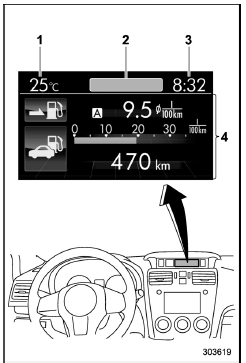
- Outside temperature indicator
- Top display (For the display setting, refer to "Top display setting"
- Clock
- Driving information display (For the displayed contents, refer to "Basic screens
 Features
The multi function display has the following
functions.
Description
Displays useful messages, such
as warning information, etc.
Displays basic screens (e.g. fuel
consumption screen, etc.)
Sets ...
 Basic operation
Control switch
Up (select)
ENTER (push)
Down (select)
By operating "
" or "
" of the control
switch, the screens and selection items
can be switched. When the button i ...
Other materials:
11
CRUISE CONTROL SYSTEM (DIAGNOSTICS) > Diagnostic Procedure with Cancel Code11When CRUISE switch is pressed, or a malfunction related to CRUISE switch occurs, this is detected.Trouble symptom:• Cruise control cannot be set. (Cancelled immediately.)• Cruise control cannot be released.Wi ...
Engine oil setting
1. Perform the preparation steps according
to "Preparation for maintenance settings"
2. Operate the "
" or "
" switch to
select the "Engine Oil" item. Then push
the
button.
3. Select the setting location (month, day,
year or distance) by operating the "
" or ...
Dtc b2274 acc relay control circuit
KEYLESS ACCESS WITH PUSH BUTTON START SYSTEM (DIAGNOSTICS) > Diagnostic Procedure with Diagnostic Trouble Code (DTC)DTC B2274 ACC RELAY CONTROL CIRCUITDTC detecting condition:When malfunction is detected in ACC relay drive circuit in the keyless access CM or external circuit.Trouble symptom:Each ...
