
Subaru Crosstrek Owners Manual: Lifetime fuel consumption resetting
1. Perform the preparation steps according to "Preparation for initialization"
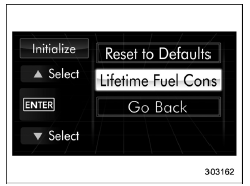
2. Operate the "  " or "
 " switch to
select the "Lifetime Fuel Consumption
Resetting" item. Then push the
" switch to
select the "Lifetime Fuel Consumption
Resetting" item. Then push the  button.
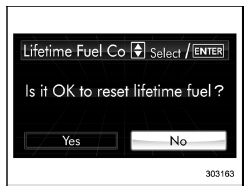
3. The system will prompt a Yes/No
dialogue ("No" is selected first). To reset
the lifetime fuel consumption, select "Yes"
by operating the " " switch.
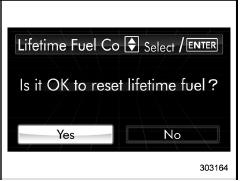
4. Confirm the setting by pushing the
 button.
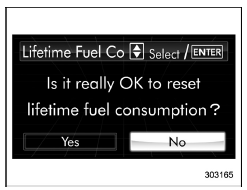
5. Reconfirmation will be displayed. If
you are sure you want to proceed, select
"Yes" by operating the "  " switch.
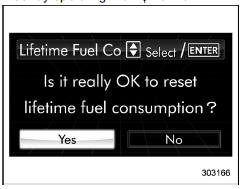
6. Confirm the setting again by pushing
the  button.
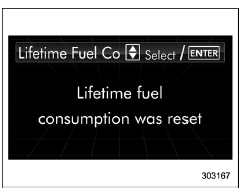
7. The system will notify you that the setting is complete.
 Reset to factory default settings
1. Perform the preparation steps according
to "Preparation for initialization"
2. Operate the " " or "
" switch to
select the "Reset to Defaults" item. Then
push the button.
...
 Light control switch
CAUTION
Use of any lights for a long period
of time while the engine is not
running can cause the battery to
discharge.
Before leaving the vehicle, make
sure that the lights are turned o ...
Other materials:
Registration
For example, to register "32468" as the
PIN code, perform the following procedure.
1. Press the rear lock button three times.
2. After a buzzer (ding) sounds once,
press the rear lock button twice.
3. After a buzzer (ding) sounds once,
press the rear lock button four times.
4. After a ...
Location
GLASS/WINDOWS/MIRRORS > Relay and FuseLOCATIONMain fuse boxRear defogger relay(A)Fuse 25 A (rear defogger)(B)Relay & fuse boxFuse 7.5 A (remote control mirror)(C)Fuse 15 A (wiper deicer)(D)Fuse 7.5 A (power window)(E)Relay holderPower window relay(F)Wiper deicer relay(G)NOTE:For other related ...
Inspection
PARKING BRAKE > Parking Brake LeverINSPECTION1. LEVER ASSY1. Operate the lever assembly - hand brake 3 to 4 times and fully return the lever assembly - hand brake.2. While slowly pulling up the lever assembly - hand brake, count the notches.Lever stroke:7 to 8 notches when pulled with a force of ...
