
Subaru Crosstrek Owners Manual: Jump starting
WARNING
- Battery fluid is SULFURIC ACID.
Do not let it come in contact with the eyes, skin, clothing or the vehicle.
If battery fluid gets on you, thoroughly flush the exposed area with water immediately. Get medical help if the fluid has entered your eyes.
If battery fluid is accidentally swallowed, immediately drink a large amount of milk or water, and obtain immediate medical help.
Keep everyone including children away from the battery. - The gas generated by a battery explodes if a flame or spark is brought near it. Do not smoke or light a match while jump starting.
- Never attempt jump starting if the discharged battery is frozen. It could cause the battery to burst or explode.
- Whenever working on or around a battery, always wear suitable eye protectors, and remove metal objects such as rings, bands or other metal jewelry.
- Be sure the jumper cables and
clamps on them do not have
loose or missing insulation.
Do not jump start unless cables in suitable condition are available.
- A running engine can be dangerous.
Keep your fingers, hands, clothing, hair and tools away from the cooling fan, belts and any other moving engine parts.
Removing rings, watches and ties is advisable.
- Jump starting is dangerous if it done incorrectly. If you are unsure about the proper procedure for jump starting, consult a competent mechanic.
When your vehicle does not start due to a run down (discharged) battery, the vehicle may be jump started by connecting your battery to another battery (called the booster battery) with jumper cables.
How to jump start
1. Make sure the booster battery is 12 volts and the negative terminal is grounded.
2. If the booster battery is in another vehicle, do not let the two vehicles touch.
3. Turn off all unnecessary lights and accessories.
4. Connect the jumper cables exactly in the sequence illustrated.
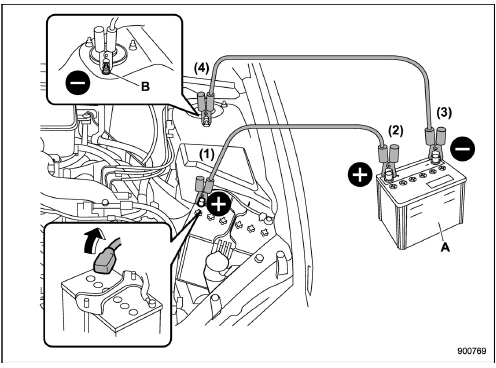
- Booster battery
- Strut mounting nut
(1) Connect one jumper cable to the positive (+) terminal on the discharged battery.
(2) Connect the other end of the jumper cable to the positive (+) terminal of the booster battery.
(3) Connect one end of the other cable to the negative (−) terminal of the booster battery.
(4) Connect the other end of the cable to the strut mounting nut of the vehicle with the discharged battery.
Make sure that the cables are not near any moving parts and that the cable clamps are not in contact with any other metal.
5. Start the engine of the vehicle with the booster battery and run it at moderate speed. Then start the engine of the vehicle that has the discharged battery.
6. When finished, carefully disconnect the cables in exactly the reverse order.
 Tire pressure monitoring system (TPMS) (U.S.-spec. models)
Low tire pressure warning light (type A)
Low tire pressure warning light (type B)
The tire pressure monitoring system provides
the driver with the warning message
indicated by sending a si ...
 Engine overheating
WARNING
Never attempt to remove the radiator
cap until the engine has been
shut off and has fully cooled down.
When the engine is hot, the coolant
is under pressure. Removing the
cap while the ...
Other materials:
13
CRUISE CONTROL SYSTEM (DIAGNOSTICS) > Diagnostic Procedure with Cancel Code13Detected when clutch pedal is depressed or malfunction related to clutch switch occurs.TROUBLE SYMPTOM:• Cruise control cannot be set.• Cruise control cannot be released.WIRING DIAGRAM:Cruise control system ...
Basic operation
This section describes some of the basic
features of the audio/visual system. Some
information may not pertain to your system.
Your audio/visual system works when the
ignition switch is turned to the "ACC" or
"ON" position.
CAUTION
To prevent the battery from being
discharged, do not leave ...
Installation
SECURITY AND LOCKS > Security Control ModuleINSTALLATIONCAUTION:• When the control module related to immobilizer has been replaced, be sure to perform the registration of immobilizer system. For detailed operation procedure, refer to “Type B” described in “REGISTRATION MAN ...
