
Subaru Crosstrek Service Manual: Installation
CONTINUOUSLY VARIABLE TRANSMISSION(TR580) > Transmission Control Module (TCM)
INSTALLATION
1. Install the bracket to the TCM.
2. Install the TCM to the bracket.
Tightening torque:
7.5 N·m (0.8 kgf-m, 5.5 ft-lb)
3. Install the TCM.
Tightening torque:
7.5 N·m (0.8 kgf-m, 5.5 ft-lb)
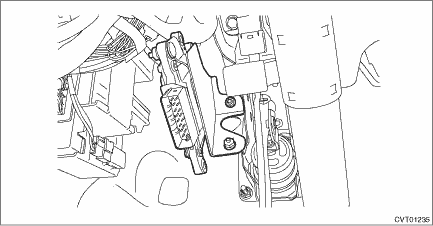
4. Install the harness connector to TCM.
NOTE:
Move the lock lever in the arrow direction, and confirm that a clicking sound is heard.
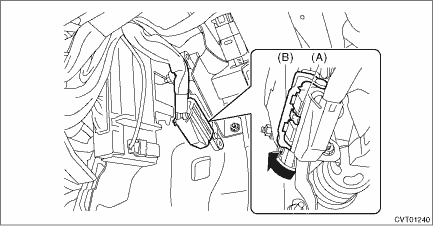
(A) | Lock button |
(B) | Lock lever |
5. Install the instrument panel lower cover. Instrument Panel Lower Cover > INSTALLATION">
6. Perform the operation of AT learning mode. Learning Control">

 Removal
CONTINUOUSLY VARIABLE TRANSMISSION(TR580) > Transmission Control Module (TCM)REMOVAL1. Disconnect the ground cable from battery. NOTE">NOTE:For model with battery sensor, disconnect the gr ...
Other materials:
Check list for interview Check
KEYLESS ACCESS WITH PUSH BUTTON START SYSTEM (DIAGNOSTICS) > Check List for InterviewCHECKInspect the following items regarding the vehicle’s state.Keyless Access with Push Button Start System Trouble Check List for Interview Received Year Month DateCustomer&rsqu ...
Replacement
BRAKE > Brake FluidREPLACEMENTCAUTION:• Do not let brake fluid come into contact with the painted surface of the vehicle body. Wash away with water immediately and wipe off if it is spilled by accident.• Do not reuse drained brake fluid. When refilling brake fluid, always refill new b ...
Removal
SEAT BELT SYSTEM > Rear Seat BeltREMOVAL1. SEAT BELT OUTER - REAR RH & LHCAUTION:• Airbag system satellite safing sensor is located in the lower of the rear seat cushion center. Be careful not to apply strong impact to the sensor when working with the rear seat cushion removed.• B ...
