
Subaru Crosstrek Service Manual: Installation
BRAKE > Stop Light Switch
INSTALLATION
1. BULB TYPE
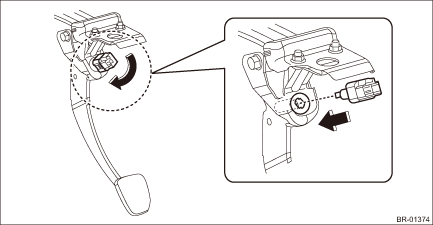
1. Install the stop light switch.
CAUTION:
• Turn the stop light switch clockwise when installing so that it can return backward by approximately 1 mm (0.04 in) and clearance is automatically adjusted.
• If it is hard to turn the switch, reduce the switch pushing force and turn it again.
(1) While pulling up the brake pedal toward you, contact the stop light switch to the stopper and temporarily install it by rotating it clockwise.
(2) Adjust the stop light switch position, and install it. Stop Light Switch > ADJUSTMENT">
(3) Install the stop light switch connector.
2. Install the cover assembly - instrument panel LWR driver.
3. Connect the battery ground terminal.
4. Check that the brake light operate properly.
5. Check the stop light switch operation.
(1) Turn the ignition switch to OFF and connect the Subaru Select Monitor.
(2) Start the engine and warm it up to a sufficient temperature.
NOTE:
Perform the following operations with the engine running.
(3) Display the data of «Brake Switch» and «Pressure Sensor Output» by following the Subaru Select Monitor display screen.
(4) Check that the stop light switch is ON with the brake pedal not depressed.
(5) Quickly depress the brake pedal 5 times.
(6) Slowly release the brake pedal depressed at the fifth time and check that the master cylinder pressure is within the standard value when the stop light switch changes from ON to OFF.
Specification:
Less than 1 Mpa (10 bar)
2. LED TYPE
1. Adjust the stop light switch position, and then secure the stop light switch by turning it clockwise. Stop Light Switch > ADJUSTMENT">
2. Install each part in the reverse order of removal.
3. Check the stop light switch operation.
 Inspection
BRAKE > Stop Light SwitchINSPECTION1. CLEARANCE CHECKNOTE:Check for clearance is applied only to LED model.1. Measure the clearance between the end of the stop light switch and the stopper.Specific ...
 Air bleeding Procedure
BRAKE > Air BleedingPROCEDURECAUTION:• Do not let brake fluid come into contact with the painted surface of the vehicle body. Wash away with water immediately and wipe off if it is spilled by ...
Other materials:
Removal
IGNITION(H4DO) > Spark PlugREMOVALSpark plug:Refer to “SPECIFICATION” for spark plug. General Description > SPECIFICATION">1. RH SIDE1. Disconnect the ground cable from battery. NOTE">2. Remove the air cleaner case. Air Cleaner Case > REMOVAL">3. Disco ...
Dtc b1816 open in passenger s airbag dual stage - 2nd step
AIRBAG SYSTEM (DIAGNOSTICS) > Diagnostic Chart with Trouble CodeDTC B1816 OPEN IN PASSENGER’S AIRBAG DUAL STAGE - 2ND STEPDiagnosis start condition:Ignition voltage is 10 V to 16 V.DTC detecting condition:• Airbag main harness circuit is open.• Airbag module harness (passenger&r ...
Installation
SECURITY AND LOCKS > Steering Lock CMINSTALLATIONCAUTION:• When the control module related to immobilizer has been replaced, be sure to perform the registration of immobilizer system. For detailed operation procedure, refer to “Type D” described in “REGISTRATION MANUAL FOR ...
