
Subaru Crosstrek Service Manual: Inspection
SEATS > Front Seat
INSPECTION
1. SEAT COVER
Check that there is no tear or fray on the cover COMPL - front backrest and the cover - front cushion.
NOTE:
For model with side airbag, if the door side of the cover COMPL - front backrest is torn or frayed, the side airbag may not be deployed properly. In this case, replace the cover COMPL - front backrest with a new part.
2. CHECK ILLUMINATION OF PASSENGER’S SEAT BELT WARNING LIGHT
Check that the passenger’s seat belt warning light illuminates when the passenger’s seat is occupied.
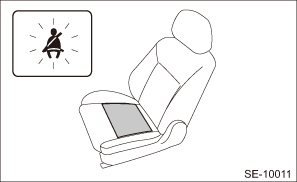
If it does not illuminate, check the seat belt warning system and the occupant detection system.
• Seat belt warning system: Seat Belt Warning System">
• Occupant detection system: Basic Diagnostic Procedure">
3. FLAT MAT HOOK
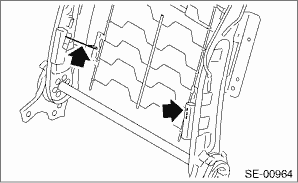
Check the flat mat hook by applying weight to the backrest assembly.
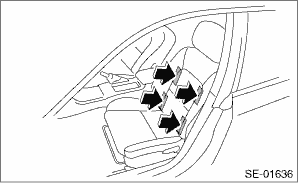
NOTE:
If the appropriate stiffness is not obtained by applying weight to the backrest assembly, the hook may be disengaged.
If it is due to the deformation of the hook, replace the hook with a new part.
 Disassembly
SEATS > Front SeatDISASSEMBLY1. DRIVER’S SEATCAUTION:Before assembling, make sure how the harnesses such as the side airbag harness and the seat belt inner - front harness are routed in order ...
 Installation
SEATS > Front SeatINSTALLATIONInstall each part in the reverse order of removal.CAUTION:• The front seat mounting bolts differ between the front mounting points and the rear mounting points. ...
Other materials:
Dtc c2121 transmitter 1 no data
TIRE PRESSURE MONITORING SYSTEM (DIAGNOSTICS) > Diagnostic Procedure with Diagnostic Trouble Code (DTC)DTC C2121 TRANSMITTER 1 NO DATANOTE:Refer to DTC C2124 for diagnostic procedure. Diagnostic Procedure with Diagnostic Trouble Code (DTC) > DTC C2124 TRANSMITTER 4 NO DATA"> ...
Assembly
CONTINUOUSLY VARIABLE TRANSMISSION(TR580) > Converter CaseASSEMBLY1. Install the oil drain plug.Tightening torque:70 N·m (7.1 kgf-m, 51.6 ft-lb)2. Install the overflow drain plug.NOTE:Overflow plug of differential gear oil is temporarily attached.3. Install all plugs.NOTE:Use new O-rings.T ...
Dtc c2521 speed abnormal
TIRE PRESSURE MONITORING SYSTEM (DIAGNOSTICS) > Diagnostic Procedure with Diagnostic Trouble Code (DTC)DTC C2521 SPEED ABNORMALDTC DETECTING CONDITION:Detected when transmitter normal signal is received at a vehicle speed of less than 6 km/h (4 MPH).Trouble symptom:Tire pressure warning light bli ...
