
Subaru Crosstrek Service Manual: Inspection
DRIVE SHAFT SYSTEM > Front Hub Unit Bearing
INSPECTION
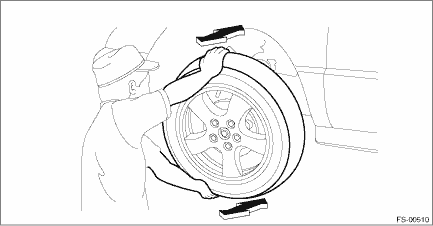
1. Moving the front tire up and down by hand, check there is no looseness in bearing, and check the wheel rotates smoothly.
CAUTION:
If there is unsmooth sliding operation or abnormal noise in the bearing, replace the hub unit bearing.
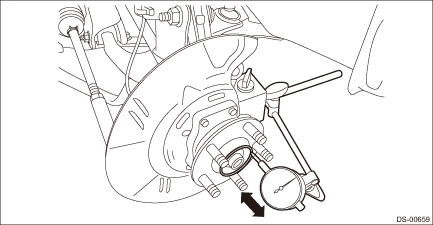
2. Inspect the hub unit bearing for axial looseness.
(1) Remove the tire and disc rotor.
(2) Using a dial gauge, check the axial looseness. Replace the hub unit bearing if looseness exceeds the limit.
Service limit:
Maximum: 0.05 mm (0.0020 in)
 Disassembly
DRIVE SHAFT SYSTEM > Front Hub Unit BearingDISASSEMBLYUsing the ST or a hydraulic press, push out the hub bolt (b) from the front hub unit bearing (a).CAUTION:• Be careful not to hammer the h ...
 Installation
DRIVE SHAFT SYSTEM > Front Hub Unit BearingINSTALLATION1. Place the front brake back plate between the front axle housing and the front hub unit bearing, and tighten the bolt.CAUTION:• Do not ...
Other materials:
Camera adjustment, inspection Procedure
EyeSight > Camera Adjustment, InspectionPROCEDURECAUTION:• Perform the camera adjustment and inspection at curb weight without passengers.• Handle RANDOM CHART (ST) carefully so as not to break it with the adhesive force of the tape.Perform inspection or adjustment according to the fo ...
Removal
CONTINUOUSLY VARIABLE TRANSMISSION(TR580) > CVTF Cooler (With Warmer Function)REMOVALCAUTION:If the CVTF and engine coolant is spilt over exhaust pipe, wipe it off with cloth to avoid emitting smoke or causing a fire.1. Disconnect the ground cable from battery. NOTE">NOTE:For model with ...
Read diagnostic trouble code (dtc) Operation
VEHICLE DYNAMICS CONTROL (VDC) (DIAGNOSTICS) > Read Diagnostic Trouble Code (DTC)OPERATION1. On «Start» display, select «Diagnosis».2. On «Vehicle selection» display, input the vehicle information and select «Confirmed».3. On «Main Menu» display, select «Each System».4. On «Select Sy ...
