
Subaru Crosstrek Service Manual: Inspection
CLUTCH SYSTEM > Clutch Disc and Cover
INSPECTION
1. CLUTCH DISC
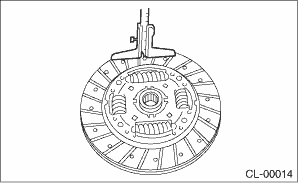
1. Facing wear
Measure the depth from the facing surface to the rivet head. Replace if the face is worn locally or worn down to less than the specified value.
Depth to rivet head:
Limit of sinking
0.8 mm (0.031 in)
NOTE:
Do not wash the clutch disc with any type of cleaning fluid.
2. Hardened facing
Replace the clutch disc.
3. Oil soakage on facing
Replace the clutch disc and inspect the transmission front oil seal, transmission case mating surface, engine rear oil seal and other locations for oil leakage.

(A) | Clutch facing |
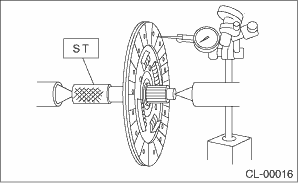
4. Deflection on facing
If deflection exceeds the specified value at the outer circumference of the facing, replace the clutch disc.
| ST 499747100 | CLUTCH DISC GUIDE |
Limit for deflection:
0.7 mm (0.028 in) at R = 110 mm (4.33 in)
5. If there is spline wear, loose rivets, failed damper springs, etc., replace the clutch disc.
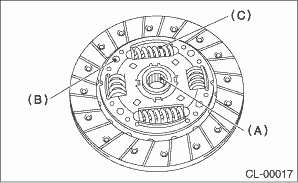
(A) | Spline |
(B) | Rivet |
(C) | Damper spring |
2. CLUTCH COVER
NOTE:
Visually check the following items without disassembling, and replace or repair if defective.
1. Loose thrust rivet
2. Damaged or worn bearing contact area at the center of diaphragm spring
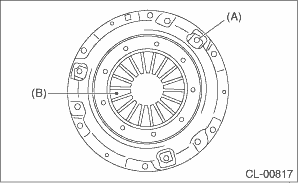
(A) | Thrust rivet |
(B) | Diaphragm spring |
3. Damaged or worn disc contact surface of the pressure plate
4. Loose strap plate installation area
5. Worn diaphragm sliding area
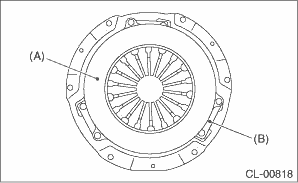
(A) | Pressure plate |
(B) | Strap plate |

 Removal
CLUTCH SYSTEM > Clutch Disc and CoverREMOVAL1. Remove the transmission assembly from the vehicle. Manual Transmission Assembly > REMOVAL">2. Attach the ST on the flywheel.ST 499747100 ...
Other materials:
Installation
BRAKE > Brake HoseINSTALLATION1. FRONT BRAKE HOSE1. Secure the brake hose to strut mount.Tightening torque:Brake hose: 33 N·m (3.36 kgf-m, 24.3 ft-lb)2. Connect the brake hose to the front caliper body assembly using a new gasket.Tightening torque:Union bolt: 26 N·m (2.65 kgf-m, 19. ...
Inspection
DRIVE SHAFT SYSTEM > Rear Hub Unit BearingINSPECTION1. Moving the rear tire up and down by hand, check there is no looseness in bearing, and check the wheel rotates smoothly.CAUTION:If there is unsmooth sliding operation or abnormal noise in the bearing, replace the rear hub unit bearing.2. Inspe ...
Removal
HVAC SYSTEM (HEATER, VENTILATOR AND A/C) > Blower Motor Unit AssemblyREMOVALCAUTION:Before handling the airbag system components, refer to “CAUTION” of “General Description” in “AIRBAG SYSTEM”. General Description > CAUTION">1. Disconnect the ground ...
