
Subaru Crosstrek Owners Manual: How to use keyless access functions
Keyless access function tips
- Turn off the push-button ignition switch before locking the doors (including rear gate) using the keyless access function. It is not possible to lock the doors (including the rear gate) using the keyless access function when the push-button ignition switch is on the "ACC" or "ON" position. For details about turning off the pushbutton ignition switch, refer to "Switching power status" 3-7.
- If the door handle is gripped with a gloved hand, the door lock may not be released.
- If the door lock sensor is touched three times or more repeatedly, the system will ignore the sensor operation.
- When performing the locking procedure too quickly, locking may not have been completed. After performing the locking procedure, it is recommended to pull the REAR door handle to confirm that the doors have been locked.
- It is possible to lock the doors even when one of the doors is open. After performing the locking procedure, close the opened door or rear gate to lock it.
- Within 3 seconds after locking the doors and the rear gate by using the keyless access function, it is not possible to unlock doors and/or the rear gate by using the keyless access function.
- When locking, be sure to carry the access key to prevent locking the access key in the vehicle.
- The setting of the hazard warning flasher operation and the volume of the audible signal can be changed by your SUBARU dealer. We recommend that you contact your SUBARU dealer for details.
- For models with the multi function display, the setting of the hazard warning flasher operation can be changed by operating the multi function display. For details, refer to "Hazard warning flasher setting" 3-78.
Unlocking
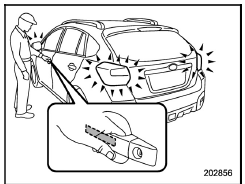
Carry the access key, and grip the door handle.
- When the driver's door handle is gripped, only the driver's door will be unlocked.
- When the front passenger's door handle is gripped, all doors (including the rear gate) will be unlocked.
Also, an electronic chirp will sound twice and the hazard warning flashers will flash twice.
Opening rear gate
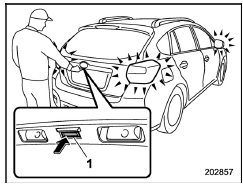
- Rear gate opener button
Carry the access key, and press the rear gate opener button. Only the rear gate will be unlocked and opened. Also, an electronic chirp will sound twice and the hazard warning flashers will flash twice.
Locking with the door lock sensor
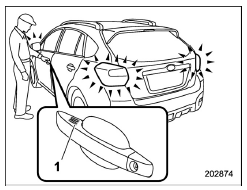
- Door lock sensor
Carry the access key, close all doors (including the rear gate) and touch the door lock sensor on the door handle. All doors including the rear gate will be locked. Also, an electronic chirp will sound once and the hazard warning flashers will flash once.
NOTE
After touching the door lock sensor to lock all of the doors (including the rear gate), if you touch the door lock sensor once more to attempt the lock operation without first unlocking the doors, nothing will happen, even if the door lock sensor is touched. In this case,perform the unlocking operation once first. You can then touch the door lock sensor to lock the doors.
Locking with the rear lock button
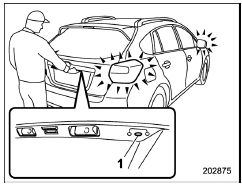
- Rear lock button
Carry the access key, close all doors including the rear gate and press the rear lock button. The rear gate and all doors will be locked. Also, an electronic chirp will sound once and the hazard warning flashers will flash once.
 Operating ranges
Antenna
Operating range
The operating range of the door locking/
unlocking function is approximately 16
to 32 in (40 to 80 cm) from the respective
door handle.
The operating ran ...
 Power saving function
The keyless access function will be
disabled in the following cases to protect
the access key battery and the vehicle
battery.
Case 1: When the keyless access function and the remote keyless en ...
Other materials:
Inspection
BRAKE > Front Brake PadINSPECTION1. Check the pad thickness (A).NOTE:• Always replace the pads of both wheels and both sides as a set.• Replace pad clips if they are twisted or worn.• Replace the pad if there is oil or grease on it. Standard (A)Wear limit (B)Pad thickness11 mm ( ...
12
CRUISE CONTROL SYSTEM (DIAGNOSTICS) > Diagnostic Procedure with Cancel Code12Detected when brake pedal is depressed or malfunction related to stop light & brake switch occurs.TROUBLE SYMPTOM:• Cruise control cannot be set.• Cruise control cannot be released.WIRING DIAGRAM:Cruise c ...
Installation
CONTINUOUSLY VARIABLE TRANSMISSION(TR580) > Transfer ClutchINSTALLATION1. Install the thrust bearing.NOTE:Make sure to install in the right direction.2. Install the transfer clutch assembly.3. Select the transfer driven gear shim. Transfer Clutch > ADJUSTMENT">4. Attach the selected t ...
