
Subaru Crosstrek Owners Manual: Fuel consumption screen
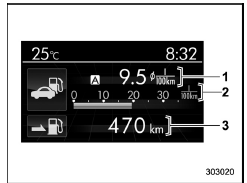
- Average fuel consumption corresponding to the driving distance of each trip meter
- Current fuel consumption
- Driving range on remaining fuel
The displayed location can be customized.
For details, refer to "Fuel consumption screen setting
 Information bar
Information bar
Outside temperature indicator
Top display
Clock
While the ignition switch is in the "ACC" or
"ON" position, the outside temperature
indicator, clock, etc. will be sho ...
 ECO gauge screen (if equipped)
Average fuel consumption corresponding
to the driving distance of each trip meter
ECO gauge
The gauge pointer shows the difference
between the current fuel consumption and
the average ...
Other materials:
Dtc p1492 coil 1 egr "a" control circuit low
ENGINE (DIAGNOSTICS)(H4DO) > Diagnostic Procedure with Diagnostic Trouble Code (DTC)DTC P1492 COIL 1 EGR "A" CONTROL CIRCUIT LOWNOTE:For the diagnostic procedure, refer to DTC P1498. Diagnostic Procedure with Diagnostic Trouble Code (DTC) > DTC P1498 COIL 4 EGR "A" CONTROL ...
Operation
CONTINUOUSLY VARIABLE TRANSMISSION (DIAGNOSTICS) > AT OIL TEMP Warning Light DisplayOPERATIONThe AT OIL TEMP light illuminates or blinks, when the ATF temperature is high and malfunction occurs in CVT.• At normal conditionAfter turning the ignition switch to ON, illuminates for 2 seconds th ...
Installation
WIPER AND WASHER SYSTEMS > Front Wiper ArmINSTALLATION1. MODELS WITHOUT EyeSight1. Install the arm assembly - windshield wiper.(1) Assemble the arm assembly - windshield wiper so that the blade assembly - windshield wiper is aligned to the ceramic print point mark of the windshield glass.(2) Tigh ...
