
Subaru Crosstrek Owners Manual: Direct Tune
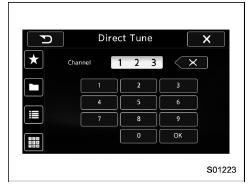
1. A channel input screen is displayed
when you touch the  tab.
tab.
2. Input any number and touch the "OK" key, receive the channel which input.
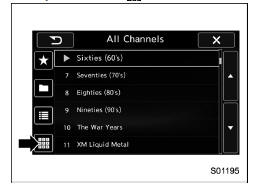
 Selecting a channel from the list
1. The categories list is displayed via
either of the following procedures.
When you touch the
tab in the
SiriusXM main screen (if the list that
was displayed the last time is Categ ...
 SXM setting
1. An option menu screen is displayed
when you touch the tab on the
lower
left side of the screen. The "Options"
screen will appear.
Option menu screen
No.
Function
...
Other materials:
Except U.S.-spec. models (type A)
The illustration above is a typical example. For some models, the combination
meter
may be slightly different than that shown in the illustration.
Tachometer
Trip meter and odometer
Select lever/gear position indicator
Speedometer
Information display selection knob
ECO gauge
F ...
Sound settings
Touch the tab to set the
sound quality.
Item
Function
Balance/
Fader
Select to adjust speaker volume
balance (right/left and front/rear).
Speed Volume
Control
Select to adjust speaker volume
coupled to vehicle speed.
Graphic
Equa ...
Defrosting
Select the "
"
or "
"
mode to quickly defrost or remove moisture from the windshield and front side windows
in the Subaru Ascent.
NOTE
When either defrost mode is selected in the Subaru Ascent, the air conditioning
system may activate automatically to improve ...
