
Subaru Crosstrek Owners Manual: CD player and disc
- This CD player is intended for use with 4.7 in. (12 cm) discs only.
- Extremely high temperatures can keep the CD player from working. On hot days, use the air conditioning system to cool the inside of the vehicle before using the player.
- Bumpy roads or other vibrations may make the CD player skip.
- If moisture gets into the CD player, the
discs may not be able to be played.
Remove the discs from the player and wait until it dries.
WARNING
CD players use an invisible laser beam which could cause hazardous radiation exposure if directed outside the unit. Be sure to operate the player correctly.
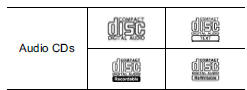 Use
only discs marked as shown
above. The following products may not
be playable on your player:
Use
only discs marked as shown
above. The following products may not
be playable on your player:
- SACD
- dts CD
- Copy-protected CD
- Video CD
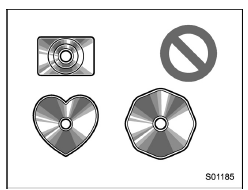
Special shaped discs
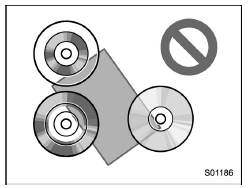
Transparent/translucent discs
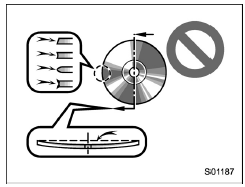
Low quality discs
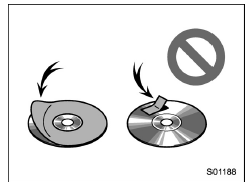
Labeled discs
CAUTION
- Do not use special shaped, transparent/ translucent, low quality or labeled discs such as those shown in the illustrations. The use of such discs may damage the player, or it may be impossible to eject the disc.
- This system is not designed for use of Dual Discs. Do not use Dual Discs because they may cause damage to the player.
- Do not use discs with a protection ring. The use of such discs may damage the player, or it may be impossible to eject the disc.
- Do not use printable discs. The use of such discs may damage the player, or it may be impossible to eject the disc.
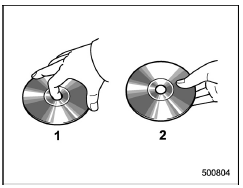
- Correct
- Wrong
- Handle discs carefully, especially when inserting them. Hold them on the edge and do not bend them. Avoid getting fingerprints on them, particularly on the shiny side.
- Dirt, scratches, warping, pin holes or other disc damage could cause the player to skip or to repeat a section of a track. (To see a pin hole, hold the disc up to the light.)
- Remove discs from the players when not in use. Store them in their plastic cases away from moisture, heat and direct sunlight.
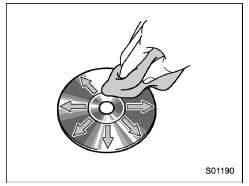
To clean a disc: Wipe it with a soft, lintfree cloth that has been dampened with water. Wipe in a straight line from the center to the edge of the disc (not in circles). Dry it with another soft, lint-free cloth. Do not use a conventional record cleaner or anti-static device.
CD-R/RW discs
- CD-R/CD-RW discs that have not been subject to the "finalizing process" (a process that allows discs to be played on a conventional CD player) cannot be played.
- It may not be possible to play CD-R/ CD-RW discs recorded on a music CD recorder or a personal computer because of disc characteristics, scratches or dirt on the disc, or dirt, condensation, etc. on the lens of the unit.
- It may not be possible to play CD-R/ CD-RW discs recorded on a music CD recorder or a personal computer because of disc characteristics, scratches or dirt on the disc, or dirt, condensation, etc. on the lens of the unit.
- CD-R/CD-RW discs may be damaged by direct exposure to sunlight, high temperatures or other storage conditions. The unit may be unable to play some damaged discs.
- If you insert a CD-RW disc into the player, playback will begin more slowly than with a conventional CD or CD-R disc.
- Recordings on CD-R/CD-RW cannot be played using the DDCD (Double Density CD) system.
USB memory device
- USB communication formats: USB 1.1/2.0 HS (480 Mbps) and FS (12 Mbps)
- File formats: FAT 16/32
- Correspondence class: Mass storage class
iPod
The following iPod, iPod nano, iPod classic, iPod touch and iPhone devices can be used with this system.
Made for
- iPod touch (5th generation)*
- iPod touch (4th generation)
- iPod touch (3rd generation)
- iPod touch (2nd generation)
- iPod touch (1st generation)
- iPod classic
- iPod nano (7th generation)*
- iPod nano (6th generation)*
- iPod nano (5th generation)
- iPod nano (4th generation)
- iPod nano (3rd generation)
- iPod nano (2nd generation)*
- iPod nano (1st generation)*
- iPhone 5s*
- iPhone 5c*
- iPhone 5*
- iPhone 4s
- iPhone 4
- iPhone 3GS
- iPhone 3G
- iPhone
*: iPod video not supported
Depending on differences between models or software versions etc., some models might be incompatible with this system.
 Radio
Radio
Usually, a problem with radio reception
does not mean there is a problem with the
radio - it is just the normal result of
conditions outside the vehicle.
For example, nearby buildings and terrai ...
 File information
Compatible compressed files (Audio)
Corresponding sampling frequency (Audio)
Corresponding bit rates (Audio)
(Variable Bit Rate (VBR) compatible)
MP3 (MPEG Audio Layer 3), WMA
(Wi ...
Other materials:
Select lever/gear position indicator (CVT models)
Type A
Upshift indicator
Downshift indicator
Select lever/gear position indicator
Type B
Upshift indicator
Downshift indicator
Select lever/gear position indicator
This indicator shows the position of the
select lever.
When the manual mode is selected, the
gear pos ...
Certification for the BSD/RCTA
U.S.-spec. models:
FCC ID: OAYSRR2A
CAUTION
FCC WARNING
Changes or modifications not expressly
approved by the party responsible
for compliance could void
the user's authority to operate the
equipment.
This device complies with part 15 of the
FCC Rules. Operation is subject to the
followi ...
Engine electrical system Wiring diagram
WIRING SYSTEM > Engine Electrical SystemWIRING DIAGRAM1. WITHOUT PUSH BUTTON START2. WITH PUSH BUTTON START ...
