
Subaru Crosstrek Owners Manual: BSD/RCTA OFF switch
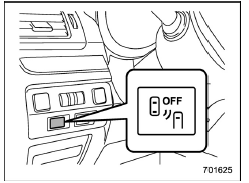
BSD/RCTA OFF switch
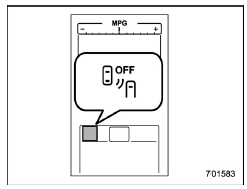
BSD/RCTA OFF indicator
If the BSD/RCTA OFF switch is pressed, the BSD/RCTA OFF indicator appears on the multi information display of the combination meter, and the BSD/RCTA is deactivated.
Press the switch again to activate the BSD/RCTA. The BSD/RCTA OFF indicator will disappear.
NOTE
In the following cases, the system may not operate properly due to blocked radar waves. Press the BSD/ RCTA OFF switch to deactivate the system.
- When towing a trailer
- When a bicycle carrier or other item is fitted to the rear of the vehicle
- When using a chassis dynamometer or free roller device, etc.
- When running the engine and making the wheels rotate while lifting up the vehicle
If the ignition switch is turned to the "LOCK"/"OFF" position, the last known status of the system is maintained. For example, if the ignition switch is turned to the "LOCK"/"OFF" position with the BSD/RCTA deactivated, the BSD/RCTA will remain deactivated the next time the ignition switch is turned to the "ON" position.
If the vehicle battery is disconnected due to situations such as battery terminal or fuse replacement, after the battery is reconnected, the BSD/RCTA will be activated.
 System malfunction indicator
System malfunction indicator
At first, this message will appear
Then this message will appear
This indicator appears when a malfunction
occurs in the system. Contact a SUBARU
dealer and ...
 Certification for the BSD/RCTA
U.S.-spec. models:
FCC ID: OAYSRR2A
CAUTION
FCC WARNING
Changes or modifications not expressly
approved by the party responsible
for compliance could void
the user's authority to operate the
e ...
Other materials:
Access key
Access key (main)
Access key (sub)
Key number plate
The vehicle has two access keys and a
key number plate. For details about the
key number plate, refer to "Key number
plate" 2-3.
A mechanical key is attached to each
access key. The mechanical key is used
for the following opera ...
Dtc p2135 throttle/pedal position sensor/switch "a"/"b" voltage correlation
ENGINE (DIAGNOSTICS)(H4DO) > Diagnostic Procedure with Diagnostic Trouble Code (DTC)DTC P2135 THROTTLE/PEDAL POSITION SENSOR/SWITCH "A"/"B" VOLTAGE CORRELATIONDTC detecting condition:Immediately at fault recognitionTrouble symptom:• Improper idling• Poor driving pe ...
General diagnostic table Inspection
FRONT SUSPENSION > General Diagnostic TableINSPECTION1. IMPROPER VEHICLE POSTURE OR IMPROPER WHEEL ARCH HEIGHTPossible causeCorrective action(1) Permanent distortion or damage of the coil springReplace.(2) Rough operation of strut or shock absorberReplace.(3) Improper installation of strut or sho ...
