
Subaru Crosstrek Owners Manual: Base display audio set (if equipped)
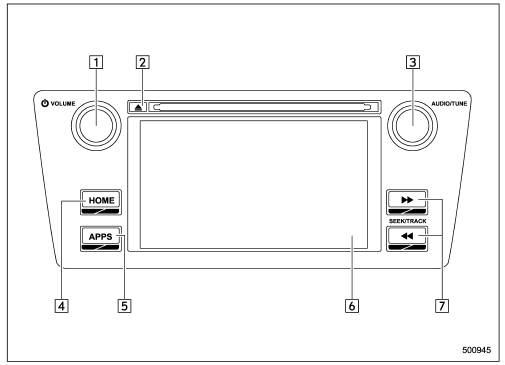
- Power/VOLUME knob
- Eject button
- AUDIO/TUNE knob
- HOME button
- APPS button
- Display
- SEEK/TRACK buttons
The audio set will operate only when the ignition switch is in the "ACC" or "ON" position.
- Power and audio controls: refer to "Basic operation"
- SUBARU STARLINK (if equipped): refer to "SUBARU STARLINK"
- Radio operation: refer to "AM/FM radio"
- Satellite radio operation (if equipped): refer to "SiriusXM Satellite Radio"
- ahaTM: refer to "ahaTM by HARMAN"
- Pandora(if equipped): refer to "Pandora "
- CD (compact disc) player operation: refer to "CD"
- USB storage device: refer to "USB memory"
- iPod operation: refer to "iPod"
- Bluetoothaudio: refer to "Bluetooth audio"
- Auxiliary input jack: refer to "AUX"
- Hands-free phone system: refer to "Hands-free phone system"
NOTE
HD RadioTM Technology (if equipped) should be included as a feature in the base display audio set.
This display audio set is referred to as follows.
- This display audio set is referred to as follows.
- Canadian customers: 6.2-inch infotainment system
 Audio set
Your vehicle may be equipped with one of
the following audio sets. Refer to the
pages indicated in this section for operating
details.
CAUTION
Always consult your SUBARU
dealer before insta ...
 STARLINKTM 7.0 Multimedia Plus audio set (U.S. spec. models only, if
equipped)
STARLINKTM 7.0 Multimedia Plus audio set (U.S. spec. models only, if
equipped)
The audio set will operate only when the
ignition switch is in the "ACC" or "ON"
position.
For details about how to use the
STARLINKTM 7.0 Multimedia Plus audio
set, refer to the STARLINKTM ...
Other materials:
Removal
GLASS/WINDOWS/MIRRORS > Rearview MirrorREMOVALCAUTION:• Be careful not to damage the mirror surface and the glass - front window.• Do not remove the base - inner mirror from the glass - front window.1. Release the claws, and then remove the cover.2. Release the lock lever, and slide t ...
Dtc b1572 imm circuit except antenna circuit
IMMOBILIZER (DIAGNOSTICS) > Diagnostic Procedure with Diagnostic Trouble Code (DTC)DTC B1572 IMM CIRCUIT EXCEPT ANTENNA CIRCUITDTC detecting condition:Communication failure between body integrated unit and ECMCAUTION:When the body integrated unit is replaced, registration of the immobilizer syste ...
Caution
VEHICLE DYNAMICS CONTROL (VDC) (DIAGNOSTICS) > General DescriptionCAUTION1. SUPPLEMENTAL RESTRAINT SYSTEM “AIRBAG”Airbag system wiring harness is routed near the ABS wheel speed sensor and VDCCM&H/U.CAUTION:• Do not use electrical test equipment on wiring harness and connect ...
