
Subaru Crosstrek Owners Manual: Average fuel consumption
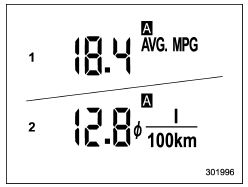
- U.S.-spec. models
- Except U.S.-spec. models
This display shows the average rate of fuel consumption since the trip meter was last reset.

- Trip knob
Pressing the trip knob toggles the display between the average fuel consumption corresponding to the A trip meter display and the average fuel consumption corresponding to the B trip meter display.
When either of the trip meter displays is reset, the corresponding average fuel consumption value is also reset.
NOTE
- The indicated values vary in accordance with changes in the vehicle's running conditions. Also, the indicated values may differ slightly from the actual values and should thus be treated only as a guide.
- When either trip meter display is reset, the average fuel consumption corresponding to that trip meter display is not shown until the vehicle has subsequently covered a distance of 1 mile (or 1 km).
Current fuel consumption
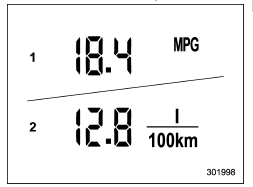
- U.S.-spec. models
- Except U.S.-spec. models
This indication shows the rate of fuel consumption at the present moment.
 Driving range on remaining fuel
U.S.-spec. models
Except U.S.-spec. models
The driving range indicates the distance
that can be driven taking into account the
amount of fuel remaining in the tank and
the average rate ...
 Journey time
The journey time shows the time that has
elapsed since the ignition switch was
turned to the "ON" position.
The journey time indication flashes each
time a complete hour has elapsed. If th ...
Other materials:
Adjustment
EXTERIOR BODY PANELS > Front DoorADJUSTMENTAdjust the clearance around the panel assembly - front door as follows.PartStandardAFender COMPL - front to Panel assembly - front door4.5±1.0 mm (0.18±0.04 in)BPanel assembly - front door to Side sill6.0+1.5, −1.0 mm (0.24+0.06, −0.04 in)C ...
Removal
EXTERIOR/INTERIOR TRIM > Glove BoxREMOVALNOTE:Refer to “Security and Locks” section for key cylinder replacement. Key Lock Cylinders > REPLACEMENT">1. Remove the pocket assembly.(1) Attach the protective tape (a) to the panel center LWR.(2) Remove the damper COMPL - pocket ...
Operation
ENTERTAINMENT > Navigation SystemOPERATION1. SUBARU STARLINK CONNECTION ID DISPLAY1. Turn the ignition switch to ACC.2. Press the AUDIO/TUNE knob (b) five times with the HOME button (a) pressed to display the {Service Menu} screen.3. Touch the {Product Information} (c) to display the {Product Inf ...
